CyberPlay editorial team · Published · Updated · 8 min read
Guide and exercises in English
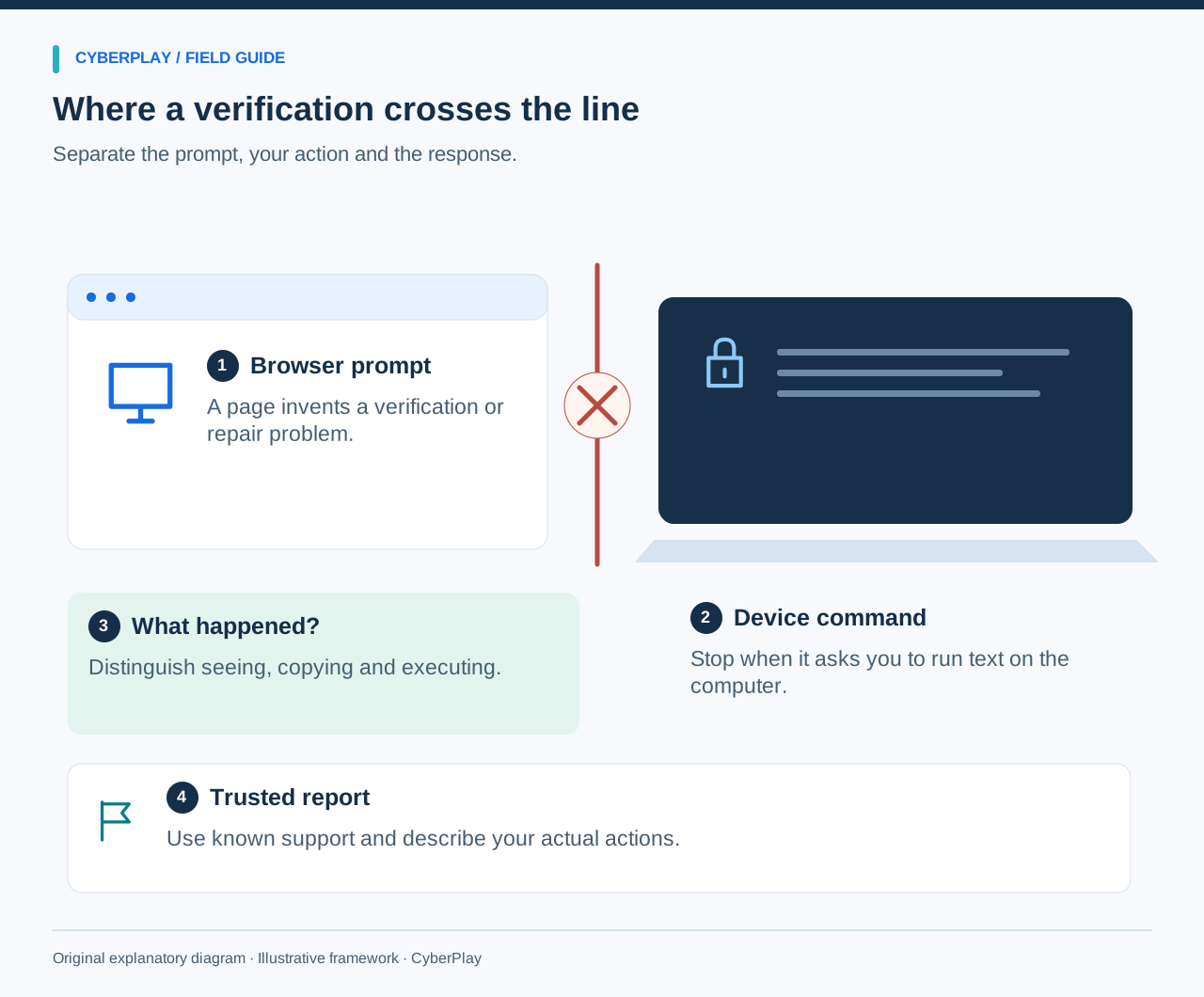
If a CAPTCHA or unexpected repair message asks you to open Run, Terminal or another command window, stop. Do not paste or execute its text. Leave the page and reach your IT or security team through the contact route you already know. A browser verification does not need you to run a command on the computer.
ClickFix is social engineering that turns a plausible problem into a request for the user to execute code. This guide teaches the consequential moment, including what to do if you already followed the instructions. You can complete the reporting worksheet and practice exercise without running any command or visiting a suspicious website.
What you’ll take away
- Judge the requested action, even on a bookmarked site with HTTPS.
- Seeing a lure, copying text and executing a command are different facts.
- If execution may have occurred, report promptly and follow the workplace incident procedure.
- Practise with inert examples and a new situation, not live attack instructions.
Recognise the move from a webpage to your device
A CAPTCHA normally helps a service distinguish a human visitor from automated traffic. ClickFix borrows that familiar setting, or invents a document, meeting or browser fault. The warning is the next instruction: operate a command tool on the device so that the page will supposedly work. The request has moved beyond ordinary browser interaction.
Microsoft’s August 2025 analysis describes this pattern in observed campaigns affecting Windows and macOS. MITRE also classifies malicious copy and paste as a user-execution technique. These reports describe attacker behaviour; they do not show that every unusual CAPTCHA is malicious or measure the effectiveness of this training.
Section sources: Think before you Click(Fix): analysis of the social engineering technique · Malicious Copy and Paste, T1204.004
Compare the action, not the logo
Use the comparison below when explaining the threat to a colleague. The familiar names and visual design of a verification provider can be copied. The absence of an obvious download is not a reason to proceed: a pasted command can start activity outside the browser.
There are legitimate technical instructions that involve command tools. At work, those belong to an independently verified task and an authorised procedure. Do not treat an unexpected webpage, search result or caller’s insistence as that authorisation.
| What you see | What changes | Safe response |
|---|---|---|
| A verification entirely inside the browser | A normal-looking check, still in context | Continue only if the service and task are expected. |
| A page requests Run or Terminal | The page asks for device-level execution | Stop; do not paste or run its text. |
| A repair prompt says to disable protection | It asks you to weaken a control | Do not change the setting; contact known support. |
| IT confirms an existing support ticket independently | A separate authorised procedure is available | Follow the verified procedure within your role. |
A real website can still show a malicious repair prompt
Opening a saved bookmark is a useful way to avoid an unfamiliar link, but it does not guarantee that every instruction on the resulting page is safe. A site or one of its components can be compromised. The Swiss Federal Office for Cybersecurity warned in August 2026 about legitimate websites displaying fake CAPTCHA prompts, and advised visitors to leave command-requesting pages and seek IT advice.
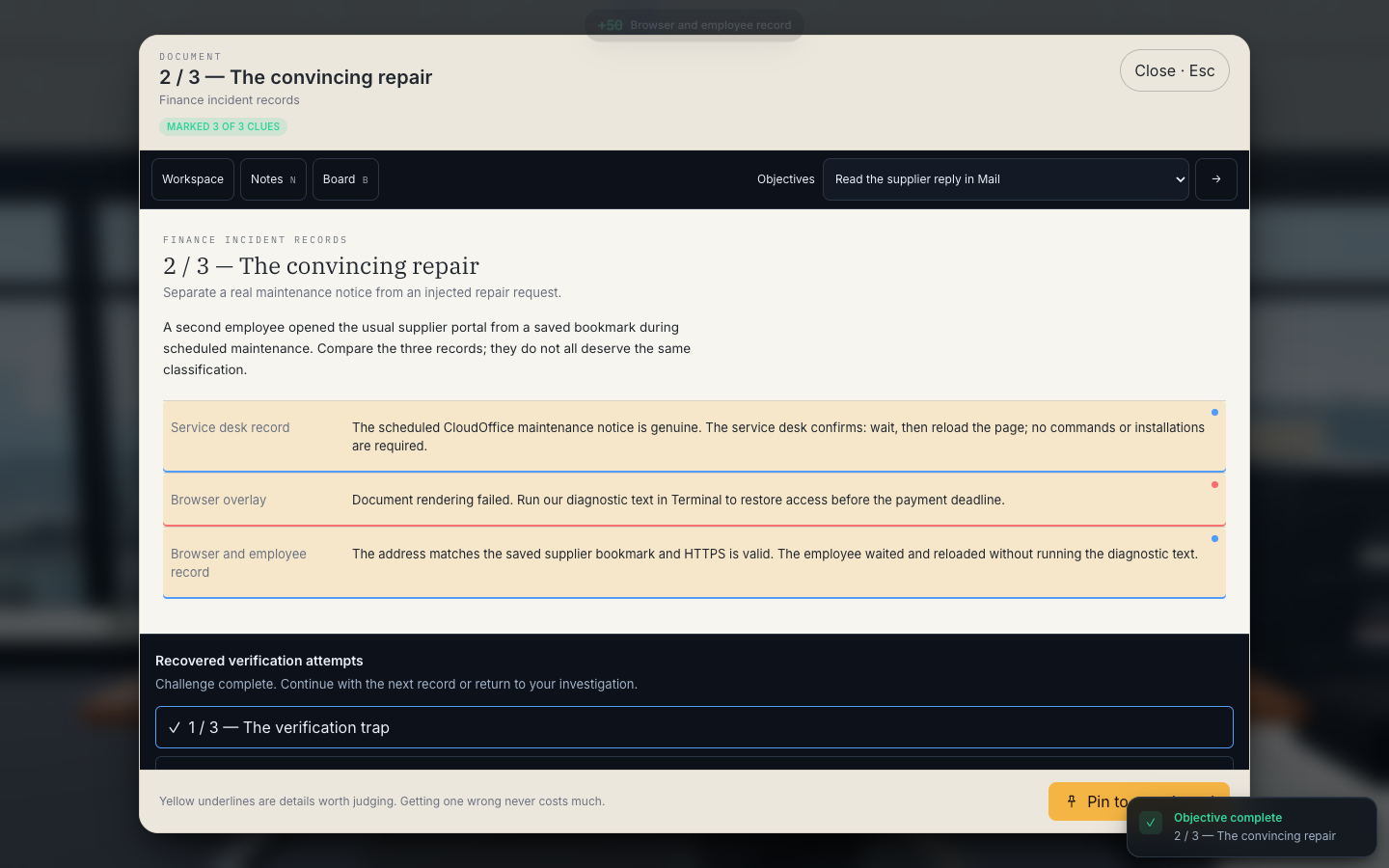
Imagine a supplier portal undergoing scheduled maintenance. Your service desk says to wait and reload later. An overlay on the same portal tells you to run a diagnostic command immediately. The genuine outage explains why you expected a problem; it does not approve the overlay’s extra action. Follow the separately verified instruction and report the conflicting request.
Expand image · Game screenshot · English interface
- A known website can carry a harmful instruction
Read what the page asks the employee to do. A genuine bookmark does not authorize a repair command supplied by a page.
- Look for evidence of the action taken
Distinguish the maintenance context, the injected instruction and the employee response before drawing a conclusion.
Section sources: Increase in compromised websites with fake CAPTCHAs
If you saw the prompt but did not run anything
Stop interacting with the page. If a command window is already open, do not paste or submit the supplied text. Close the suspicious page when you can do so normally and report the address or entry point using your approved route. Do not revisit the page to reproduce the prompt for a better screenshot.
Describe your actions precisely: you saw the prompt, clicked its verification button, copied text, or opened a command window. Do not label all of these “I ran malware”. Equally, do not assume there is no issue merely because no warning appeared. Your report helps responders decide whether device checks are needed; you do not need to prove an infection before asking for help.
If you ran the text—or are unsure whether you did
Stop ordinary work on the device and contact IT or security immediately through an established channel. State that a webpage asked you to run text and whether you remember submitting it. Use another approved device or telephone if the affected computer cannot be trusted for communication. Follow your organisation’s isolation and response procedure; avoid improvising shutdowns on operational or safety-critical equipment.
Closing the browser cannot undo an already executed command. Do not try internet cleanup commands, install an unsolicited scanner, erase history or keep experimenting. A password reset alone does not remove code that ran on the device. Responders can investigate execution, decide containment and direct any credential or session recovery. Preserve the original message and times without circulating suspected payloads to colleagues.
Use a report that separates observations from guesses
Copy these field names into the approved incident form. A short accurate report is more useful than a confident diagnosis. Mark an unknown as unknown, including whether the final key press executed anything. Share screenshots only through the approved channel and avoid exposing personal or customer information unnecessarily.
For example: “At about 14:30, an invoice preview asked me to run diagnostic text. I opened a command window but do not remember submitting it. I stopped work and called the service desk.” This gives responders a starting point without inventing a malware family or a cause.
| Record | Useful detail |
|---|---|
| Time and device | Approximate time, device identifier and work location. |
| Entry point | Message, document, advert or known portal that led to the request. |
| Requested action | What the prompt wanted, described without reproducing an executable command. |
| Actual action | Seen, clicked, copied, pasted, submitted or uncertain. |
| Observed result | Window, alert or other visible change; no guessed diagnosis. |
| Current status | Whether work stopped and who has been contacted. |
Practise with three recovered records in Phishing Detective 3D
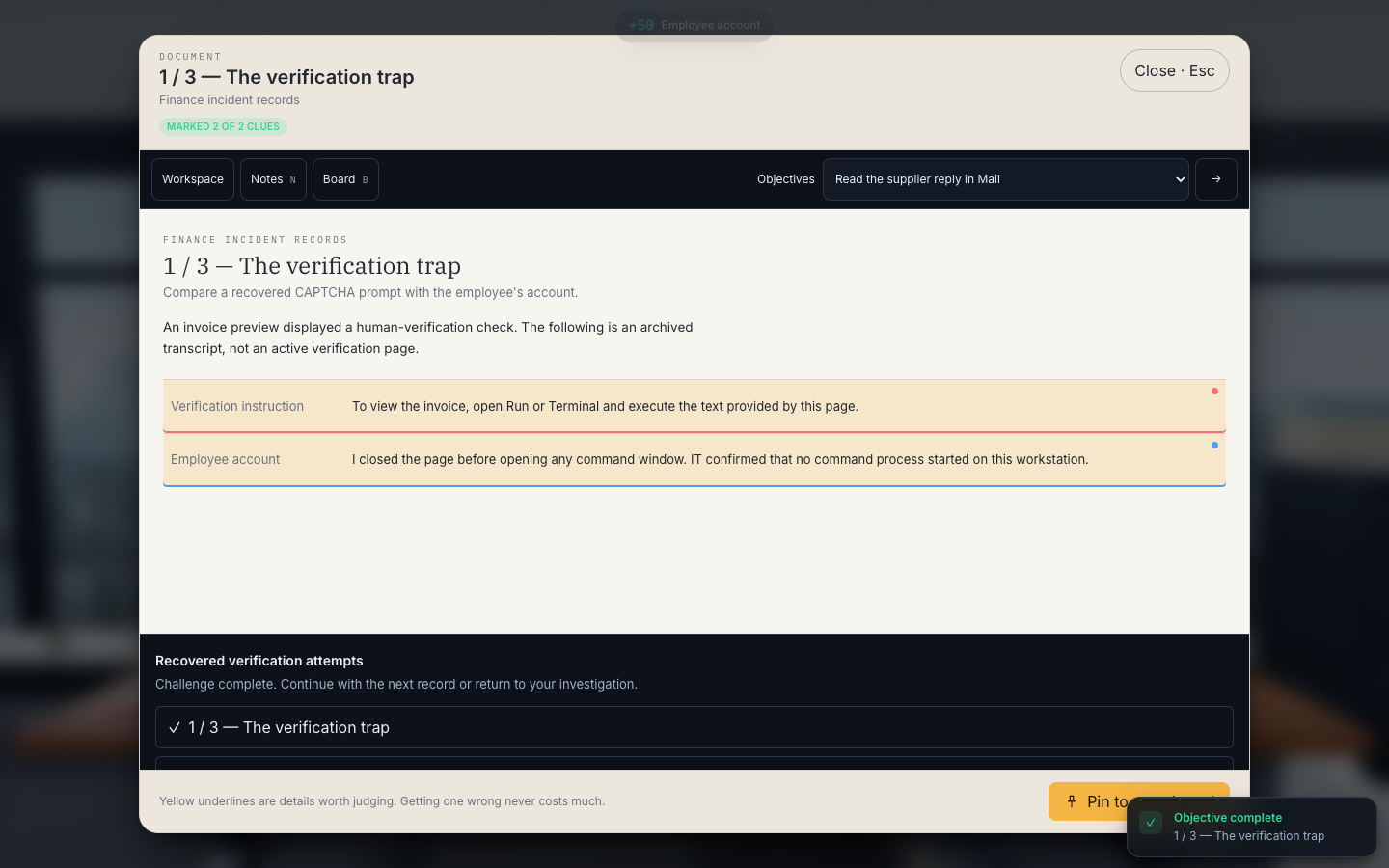
Operation Paper Trail includes three archived ClickFix records. The first is a fake verification stopped before execution. The second combines genuine maintenance, a bookmarked address and a malicious repair overlay. The third includes the employee’s account and endpoint evidence that a command executed. Classify the highlighted facts and explain what each one establishes.
This is a fictional investigation, not a live malware exercise. The case’s original mailbox compromise happened earlier through OAuth; the ClickFix records are later follow-up activity. Keeping that sequence straight is part of the lesson: a concerning event is not automatically the cause of every problem in the case.
Expand image · Game screenshot · English interface
- Identify the requested action
The archived instruction asks the employee to open Run or Terminal. That move from the page to device commands is the warning.
- Separate a prompt from execution
The employee account says the page was closed and no command process started. Report what is known instead of assuming infection.
Try a different situation before reading the answer
A useful follow-up changes the setting while keeping the decision. A learner who memorised a CAPTCHA screenshot may miss the same request inside a meeting invitation or a file preview. Read the scenario as plain text. No command, live link or downloaded file is needed.
Check the workplace process as well as the learner
For a small team, ask everyone to locate the real reporting route and explain the difference between seeing and executing. Let a colleague act as the service desk and respond to the sample report. Record process gaps, such as an inaccessible phone directory, unclear device instructions or a manager who discourages pausing urgent requests.
Later, use a new repair story and check the explanation again. Completion, XP and a correct game classification show activity in the exercise; they do not establish a reduction in workplace incidents. Keep training feedback separate from any disciplinary process so that uncertain actions can be reported honestly.
Continue with practice in English
This guide, the CyberPlay interface and Phishing Detective 3D are available in English. Open the game and work through Operation Paper Trail’s recovered verification records. For each record, identify the requested action, whether execution is supported by evidence and the next reporting step.
The gameplay pictures accompanying this guide use the English interface and depict fictional training material. After the game, adapt the reporting worksheet to your own service desk and approved device procedure. Keep the rule short enough to remember during an interruption: an unexpected webpage cannot authorise a command on your computer.
Practise ClickFix decisions in English
Review the three recovered verification records in Phishing Detective 3D. Explain the evidence and reporting decision before continuing.
Open Phishing Detective 3DSources and further reading
- Think before you Click(Fix): analysis of the social engineering technique — Microsoft Threat Intelligence, 2025. Accessed 2026-09-13
- Malicious Copy and Paste, T1204.004 — MITRE ATT&CK. Accessed 2026-09-13
- Increase in compromised websites with fake CAPTCHAs — Swiss Federal Office for Cybersecurity, 2026. Accessed 2026-09-13
Keep exploring
- Phishing training games: practise the decisions behind a suspicious message
Use phishing training games to rehearse inspection, independent verification and reporting. Includes a fictional supplier message and a practical session plan.
EN · 8 min read - AI security awareness training: safer workplace decisions about tools and data
Build practical AI security awareness training for employees: approved tools, sensitive inputs, output verification, connected permissions and original decision cards.
EN · 8 min read - How to spot a fake login page—even when it uses HTTPS
Check a login page’s real address, password-manager signals and request context. Learn why HTTPS is not proof of trust, with an English practice exercise.
EN · 8 min read - Prompt injection training for employees: check what your AI assistant can do
Teach employees to check AI actions, protect work data and report mistakes. Pair CyberPlay Courses with Data Dash practice and a practical approval checklist.
EN · 8 min read - Session and device-code phishing: why a real login page is not enough
Compare session-cookie theft, device-code phishing and OAuth consent. Learn the safe employee action with CyberPlay Courses and Find the Fake Login.
EN · 8 min read - Deepfake voice fraud training: verify the request before money or access
Build a callback routine for AI voice scams, executive impersonation and helpdesk requests. Connect CyberPlay Courses with practical game scenarios.
EN · 8 min read