CyberPlay editorial team · Published · Updated · 8 min read
Guide and exercises in English

Phishing training games let employees work through a suspicious request before facing a real one. The valuable part is the decision sequence: understand what is being requested, examine the available evidence, choose a verification route, and report concern when appropriate. A game should make that sequence visible through action and feedback.
This guide goes beyond spotting spelling mistakes. It explains how to select a useful phishing challenge, run an original supplier-message exercise, and connect practice to the tools employees use at work. The aim is to help people continue legitimate work safely, including when they cannot confidently classify a message from appearance alone.
What you’ll take away
- Teach the requested action and verification route, not only visual warning signs.
- Include legitimate messages and uncertain cases in practice.
- Connect the game’s reporting action to the real workplace process.
- Assess a changed example later and keep detection difficulty in view.
Separate game practice from delivered email simulations
In a game, the learner normally knows they are practising. You can pause a decision, inspect evidence, explain a consequence and try again. A delivered email simulation places a test message into the normal inbox and may examine behaviour in that work setting. Both can be useful, but they answer different questions and need different preparation.
Use a game to teach a process before expecting employees to demonstrate it in an unfamiliar context. If your organisation also uses simulations, coordinate their design with the training owner and reporting team. An in-game “report” button is not evidence that a mailbox integration exists, and a successful game result does not show that a real message would have been reported.
Use research as a design reference
What.Hack, a CHI 2019 phishing game study, connected message inspection to a role-playing task. Its encouraging immediate classification results came from a small student sample, not an evaluation of CyberPlay or long-term organisational incidents.
The useful design question is whether the learner has to apply a rule in context. Can they check the request, tolerate uncertainty and continue useful work? During a pilot, ask participants to explain their actions aloud. Their explanation can reveal a shortcut the score misses, such as distrusting every unfamiliar sender or approving every message containing the company logo.
Section sources: What.Hack: Engaging Anti-Phishing Training Through a Role-playing Phishing Simulation Game
First identify what the sender wants
Start each scenario with the requested action. Is the employee being asked to sign in, open a file, provide information, approve access, transfer money or change a process? The same design can appear in a harmless announcement and a dangerous request, so presentation alone is not the decision.
Have the learner restate the request in plain language: “Someone wants me to replace the supplier’s bank account today.” That sentence exposes the consequential step. It also makes the exercise accessible to people who do not recognise technical terms. Then ask what would need to be true before the action could safely proceed.
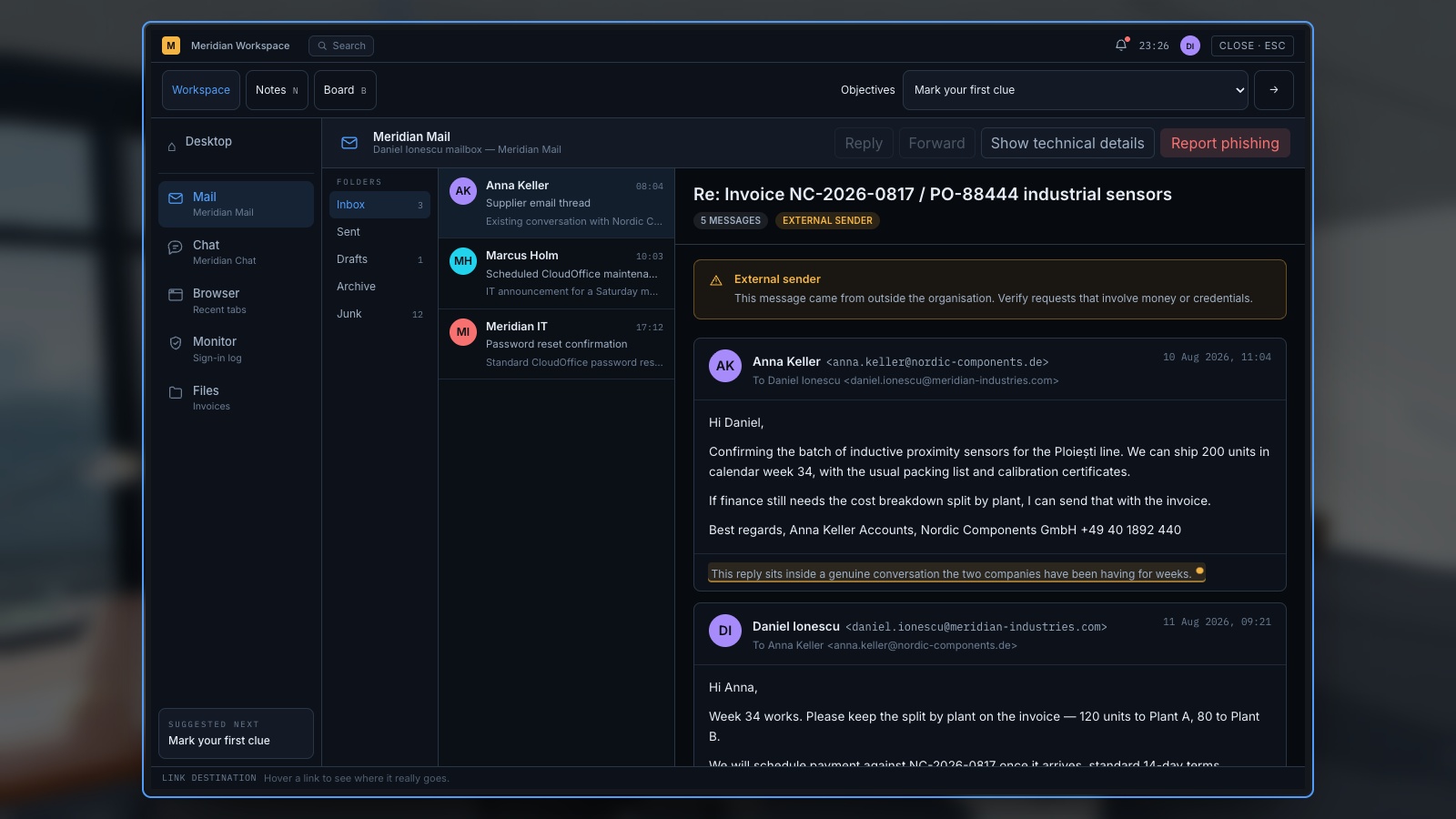
Expand image · Game screenshot · English interface
- Read the requested action
Identify what the message asks you to do before judging its familiar name or appearance.
- Verify through known contacts
Use an established contact route to verify an unexpected request, even when the sender seems familiar.
Work through a fictional supplier message
Read this example as text rather than opening a link. Every organisation and address in the exercise is fictional. The message says: “From: Mara, Accounts, accounts@northstar-supplies.example. Subject: Revised payment instructions for invoice 1048. Our bank has changed. Please pay today using the attached details. Call the number in my signature if there is any issue.”
Assume an invoice for the delivery is genuinely expected. That detail makes the request plausible, but it does not authenticate the change. Ask the learner to separate existing facts from new claims. The delivery is expected; the account change, its urgency and the new contact route still need independent confirmation.
| Element | What it tells you | What it does not establish |
|---|---|---|
| Expected invoice number | The message fits current work | That the sender controls an authorised account |
| Familiar display name | A name appears in the message | The person’s identity |
| Bank-change request | The action has financial consequences | That the change has been approved |
| Phone number in the message | A contact route was supplied | That the route is independent |
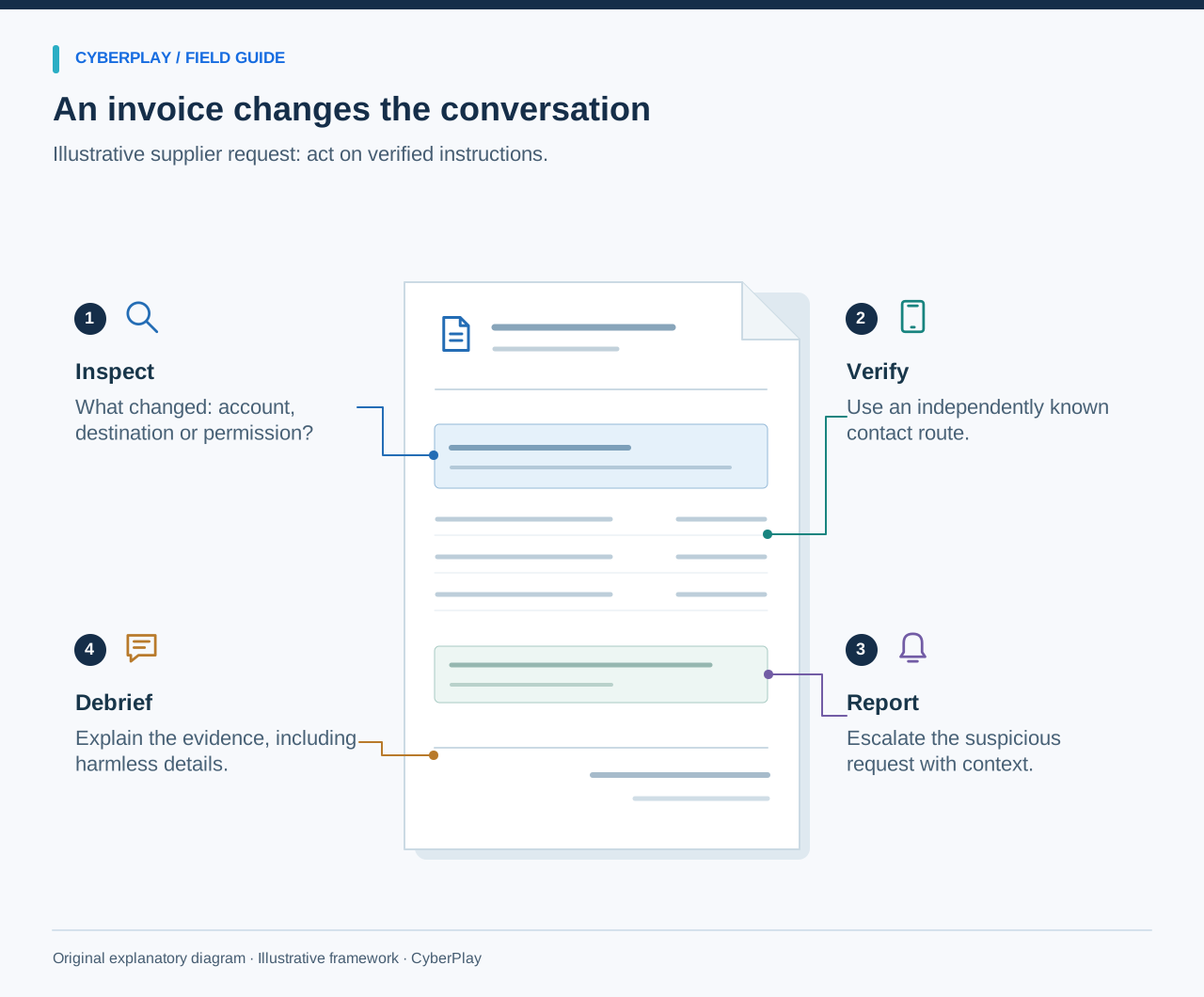
Choose a verification route that is independent
The FBI’s business email compromise guidance recommends verifying payment changes and using contact information obtained independently of the suspicious request. That principle is more useful here than trying to decide whether the writing sounds authentic.
In the exercise, use the supplier contact already held in approved records and the organisation’s normal change process. If the known contact is unavailable, hold the change and escalate according to policy. Do not replace verification with another conversation controlled by the same message. A reply in the thread or a call to its newly supplied number may simply continue the deception.
Section sources: Business Email Compromise
Teach destination inspection with its limits
When a scenario involves a link, show the destination separately from the visible label. A button labelled “Company portal” can point elsewhere. Let learners inspect the whole hostname using the device’s available preview rather than clicking through to find out. Use example domains and non-functional mock interfaces in facilitated exercises.
Keep the limits clear: a familiar-looking address does not make an unexpected request safe, and a secure connection does not prove the operator is trustworthy. Some legitimate messages also contain long tracking links. When inspection leaves uncertainty, the employee can reach the service through its known app, bookmark or established address and check for the requested task there.
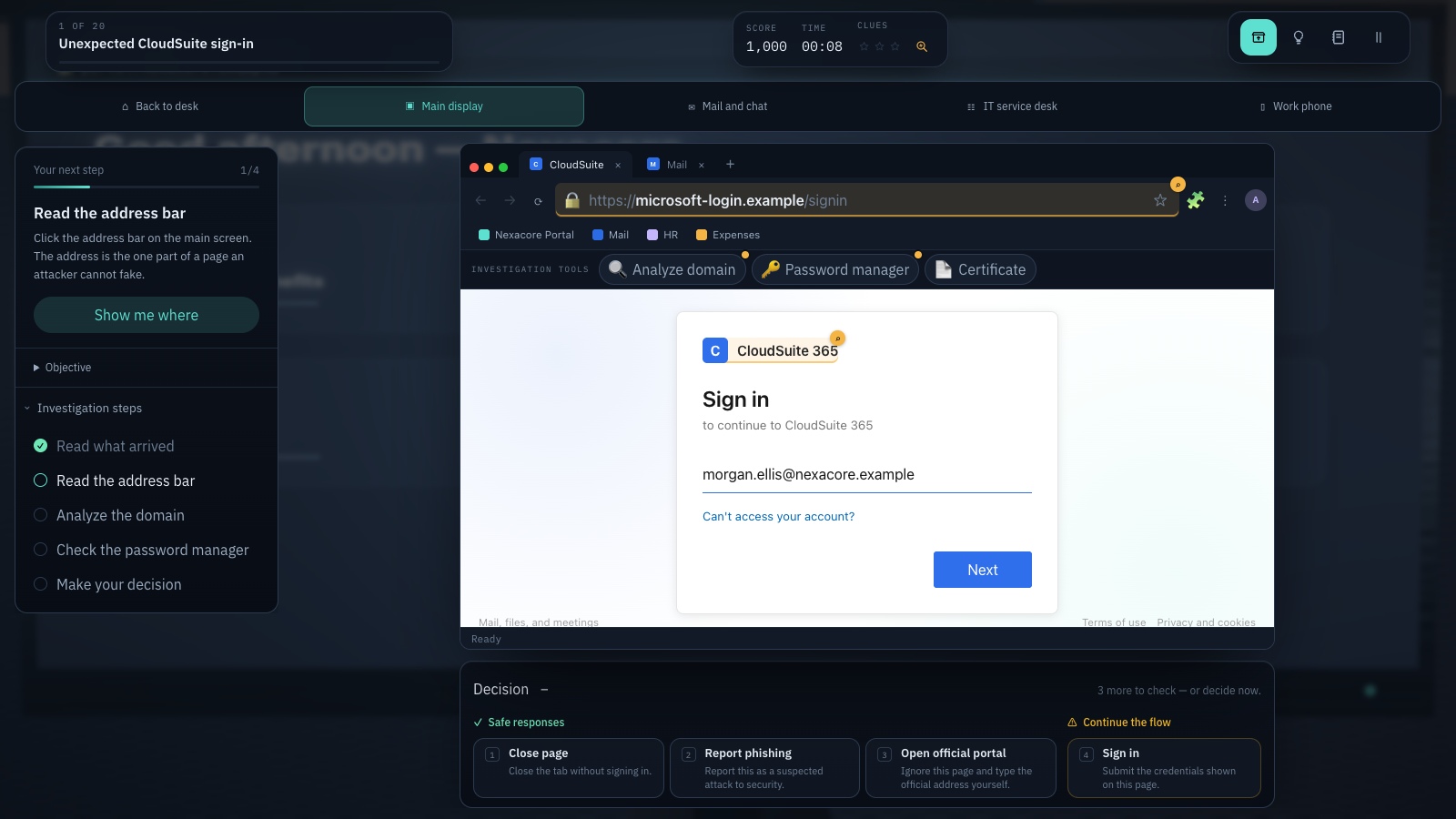
Expand image · Game screenshot · English interface
- Inspect the registrable domain
Read the registrable domain carefully; familiar words elsewhere in an address do not establish its owner.
- Use your known portal
Reach the service through a known portal and consider the context from your approved password manager.
Make reporting part of the task
A challenge that ends at “do not click” leaves an important workplace action unpractised. NIST’s small-business phishing resource collection points readers to recognition and reporting guidance. In your session, show exactly where employees should send a concern and what information the receiving team needs.
Use an approved test message to demonstrate the reporting route. If the exercise is a group discussion, ask participants to find the relevant intranet page or contact instead. Cover the after-click case without blame: report promptly, describe what happened, and follow the response team’s instructions. Do not ask staff to investigate an attachment or erase evidence to make a mistake disappear.
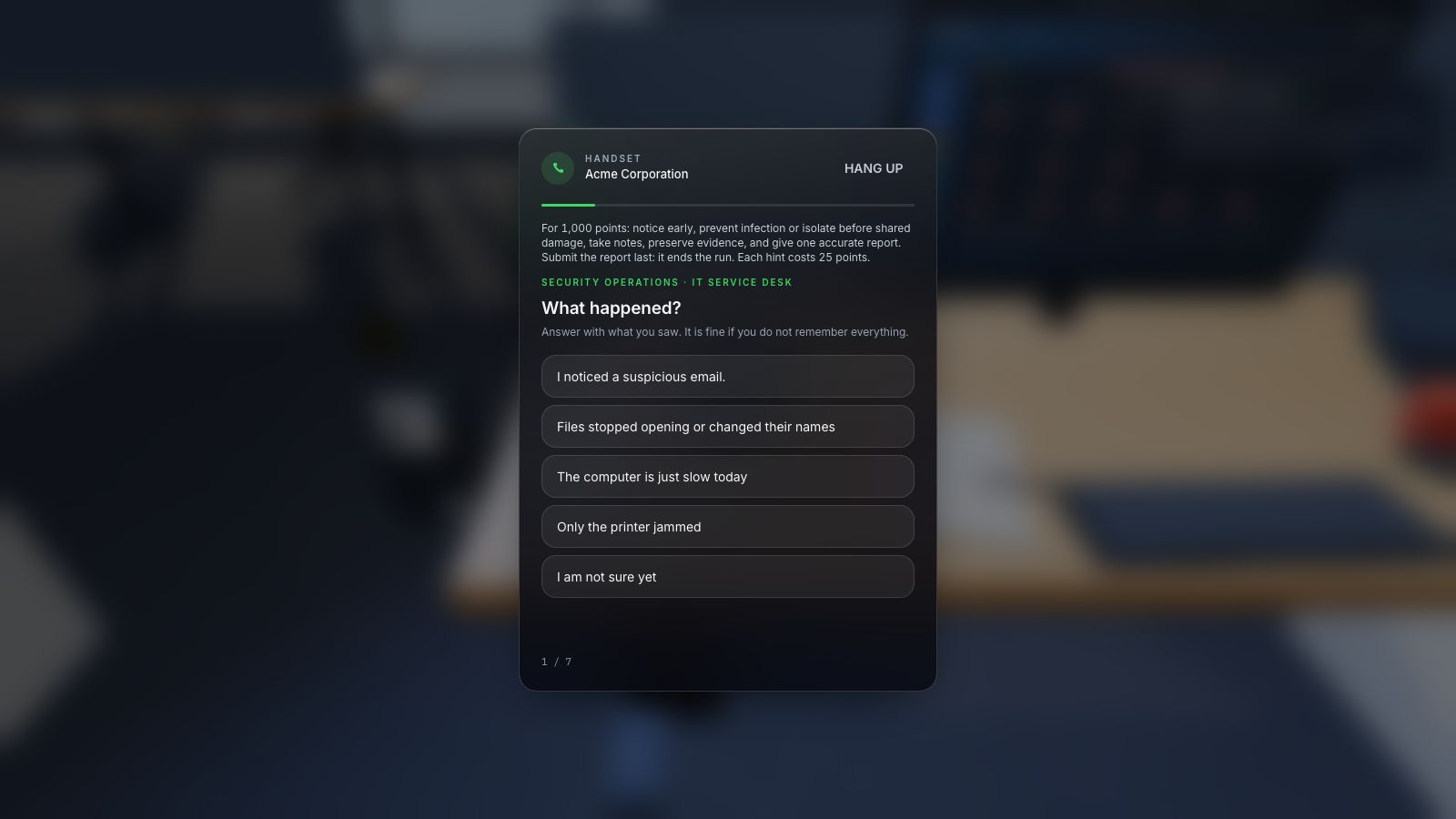
Expand image · Game screenshot · English interface
- Include time and device
Report the observed symptoms, when they appeared, and the affected device through the organisation's approved reporting route.
- Distinguish observation from diagnosis
Separate direct observations from suspected causes so responders can investigate without treating an early guess as fact.
Section sources: Phishing resources for small businesses
Facilitate a session people can use
For a first session, allow approximately twenty minutes: introduce the objective, let people try one challenge, discuss their reasoning, and rehearse the local reporting action. Timing should follow the selected game and audience. Stop before fatigue turns the exercise into hurried guessing. Provide a text or discussion alternative if the game’s controls create a barrier.
Ask three debrief questions: “What was the consequential request?”, “Which check produced independent evidence?”, and “What would you do here if you were still unsure?” Write down process problems separately from learning gaps. If employees cannot find the reporting route, fixing that access problem should become a named follow-up action.
Evaluate more than the number of correct answers
NIST’s Phish Scale addresses how difficult an email is for people to detect. Use that insight when reviewing results: a scenario that closely matches the recipient’s work is different from an obviously irrelevant lure. Comparing raw error rates without context can produce a misleading story.
Track classification, explanation and response separately. An employee might correctly suspect a message but choose an unsafe verification route. Another may be uncertain and still take the appropriate action. Include legitimate examples so the exercise does not reward stopping all work. Later, change the sender, channel or business context while preserving the underlying verification objective.
Section sources: Phishing With a Net: The NIST Phish Scale and Cybersecurity Awareness
Select a challenge and connect it to work
Explore CyberPlay’s phishing topic collection and choose a game that fits the decision you want to practise. Read its instructions and play it yourself first. Use the article’s supplier example as a separate facilitated exercise; it is not a claim that every linked game contains that exact scenario or a full payment-control workflow.
After the session, give employees a short reminder containing the approved reporting route and one verification principle. Arrange a later unfamiliar example and review the reasons behind answers. The strongest next step may be an operational change: a maintained supplier contact list, a clearer reporting button, or a manager’s explicit support for pausing a high-consequence request.
Put the decision into practice
Explore the relevant CyberPlay games, choose a suitable challenge, and discuss how its decisions connect to your own workplace procedures.
Explore practice gamesSources and further reading
- What.Hack: Engaging Anti-Phishing Training Through a Role-playing Phishing Simulation Game — Cornell University / CHI 2019. Accessed 2026-09-13
- Business Email Compromise — FBI. Accessed 2026-09-13
- Phishing resources for small businesses — NIST. Accessed 2026-09-13
- Phishing With a Net: The NIST Phish Scale and Cybersecurity Awareness — NIST. Accessed 2026-09-13
Keep exploring
- Cybersecurity awareness training for schools: a practical lesson plan
Plan teacher-led cybersecurity training for schools with video courses, student activities and games. Practise checking messages, sharing files and asking for help.
EN · 9 min read - Phishing email examples for training: inspect, verify and report
Use fictional phishing email examples for HR, invoices, deliveries and sign-ins, plus legitimate controls. Each includes a safe decision, verification route and debrief.
EN · 8 min read - Security awareness games for employees: how to choose and use them
Choose security awareness games that teach useful workplace decisions. Compare formats, run a sample session, and use a practical evaluation checklist.
EN · 8 min read - Social engineering training exercises: rehearse impersonation and payment checks
Run practical social engineering exercises for fake IT support, supplier payment changes and voice impersonation, with dialogue cards, verification steps and debriefs.
EN · 8 min read - ClickFix and fake CAPTCHA scams: what employees should do
A fake CAPTCHA asks you to run a command? Learn the ClickFix warning signs, what to report before or after execution, and practise the decision in English.
EN · 8 min read - Unexpected MFA request? What to do when you did not sign in
Received an MFA prompt you did not initiate? Learn when to deny it, verify a support call, report an accidental approval and practise the decision in English.
EN · 8 min read