CyberPlay editorial team · Published · Updated · 8 min read
Guide and exercises in English
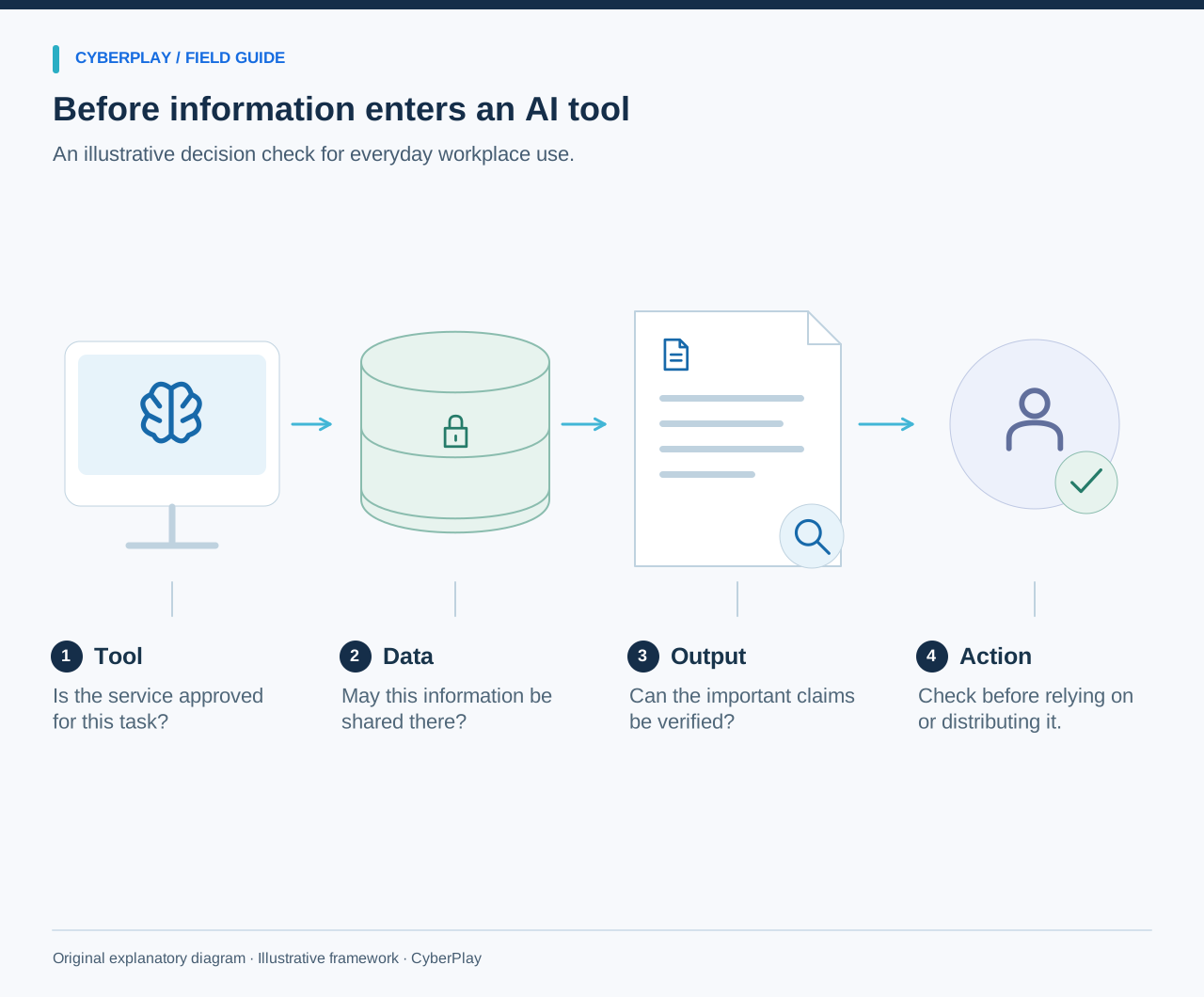
AI security awareness training should help employees decide which tool they may use, what information they may provide, what output needs checking and when to ask for help. A general presentation about artificial intelligence is not enough when someone is about to paste a customer file into a chat or let a connected assistant send a message. The decision depends on the task, the information and the tool’s approved use.
The original exercises below focus on ordinary workplace use of AI. They are separate from deepfake and impersonation training, where the issue is whether an external requester can be trusted. Use fictional records for practice and add your organisation’s current approved-tool list, data rules and reporting route. Review those instructions when products, permissions or business uses change.
What you’ll take away
- Check the approved use of the specific tool and account before entering work information.
- Treat input data and connected permissions as separate decisions.
- Verify consequential outputs against reliable sources and business records.
- Report accidental disclosure or unexpected actions through the established process.
1. Begin with the tasks employees actually perform
List concrete tasks: summarising a public article, drafting a response, analysing an internal spreadsheet, preparing code or reviewing a supplier proposal. Then identify the information and actions involved. An assistant that drafts text in a blank document presents a different workflow from one connected to a mailbox and permitted to send replies. Teach the difference using a task employees recognise.
NIST’s Generative AI Profile identifies risks including confidently false output and data privacy concerns. Use those categories to ask useful questions about a specific workflow. Do not assume that every AI product has the same retention, training-use, sharing or administrative settings. The organisation’s tool owner should provide current instructions employees can follow.
Section sources: Artificial Intelligence Risk Management Framework: Generative Artificial Intelligence Profile
2. Make tool approval specific enough to use
An approved-tool entry should name the service, account type, permitted tasks, allowed information and any restricted features. Employees also need the official access route and a contact for requests that fall outside the entry. “AI is allowed” is too vague when a person must decide whether a confidential contract can be uploaded from a personal account.
Give a worked example: the organisation permits an enterprise workspace for drafting public marketing material, but has not approved it for employee records or payment instructions. A learner can then assess a request against the stated boundary. If the tool is not listed, the practical next step is to ask the owner or use an existing approved workflow, rather than experimenting with live information.
3. Use these original information-sharing cards
The following cards are fictional. The answers depend on the stated policy, not on a universal claim that a type of information is always safe for every AI service. Ask the learner to explain what additional information would change the decision. That is a more useful skill than memorising a colour for each document type.
| Card | Stated context | Useful decision |
|---|---|---|
| Public event description | The text is already published and the approved workspace permits public copy drafting. | Proceed within that approved use, then review the output before publication. |
| Customer support export | The file contains identifiable customer messages; the proposed personal AI account is not approved for that data. | Do not upload it; use an approved process or ask the data and tool owners. |
| Internal acquisition proposal | The tool is approved for public text only; the proposal is confidential. | Keep the proposal out of that workflow and seek an authorised alternative. |
| Synthetic sample records | The exercise uses entirely fictional records and an approved training environment. | Use the sample for practice while keeping real records separate. |
4. Practise providing only what the task needs
Even when a tool is approved, ask which information is necessary for the task. A request to improve the tone of a generic appointment reminder may need the wording, not a full customer history. A demonstration can use invented names and facts. Do not teach that removing a person’s name automatically makes a record anonymous: combinations of details may still identify someone.
Have learners rewrite a fictional prompt so it contains only the permitted information. For example, replace an entire customer thread with a synthetic description of the communication problem. Then ask the tool owner whether the proposed use fits the approved boundary. The exercise should make the approval and minimisation steps visible, rather than treating careful wording as a substitute for permission.
5. Check outputs before relying on them
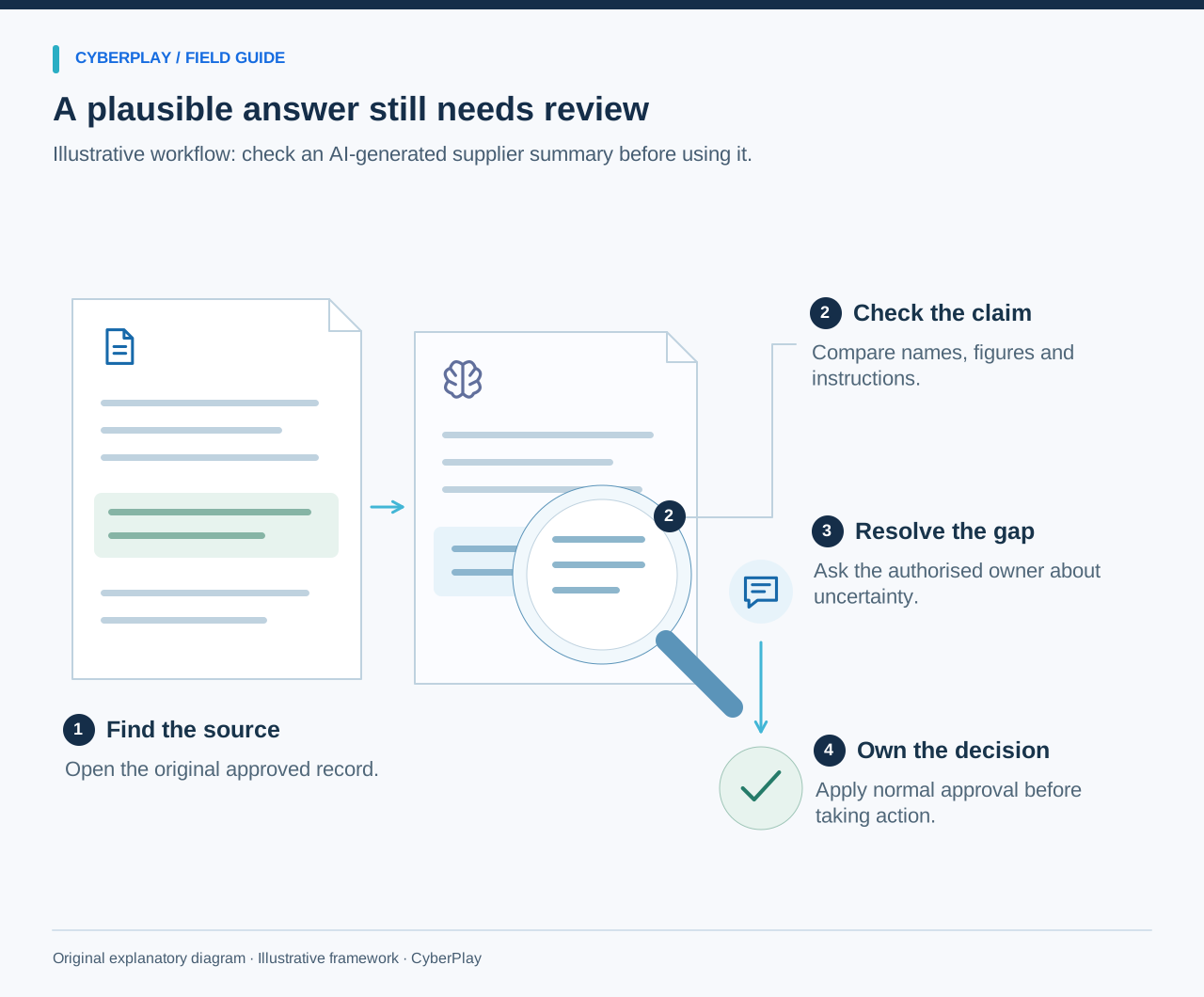
Give participants a fabricated AI summary containing an incorrect date, an unsupported claim and a citation that does not support the sentence. Provide the original fictional source document beside it. Ask them to identify each discrepancy and write a corrected version. This makes verification an action the learner performs, rather than a final slide saying “check the answer”.
NIST describes confabulation as confidently presented erroneous or false content and notes that generated citations can also mislead. Apply that concern proportionately: verify dates, amounts, factual claims and consequential recommendations against reliable material. A fluent explanation of how an answer was produced does not establish that the underlying answer is correct.
Section sources: Artificial Intelligence Risk Management Framework: Generative Artificial Intelligence Profile
6. Treat connected actions as a separate boundary
A tool that can read files or take actions needs a separate discussion from a tool that only drafts text. Explain which sources it can access, which destinations it can write to and which actions require the user’s review. Before allowing a message to be sent, the employee should understand the recipient, content and authority for sending it. Before changing records, they should understand the affected record and intended change.
Use an original scenario: a summarisation task proposes sending the full source document to an outside address. Ask whether that action belongs to the user’s request and approved workflow. Do not let apparent helpfulness replace the check. The organisation must configure permissions and review controls; employee awareness cannot compensate for unrestricted access on its own.
7. Explain prompt injection in ordinary workplace terms
An AI tool may encounter instructions embedded in a webpage, document or message that it was supposed to analyse. Those instructions may try to redirect its behaviour. NCSC’s guidance cautions that prompt injection should not be treated as a problem with the same complete mitigation model as ordinary SQL injection. For employees, the practical concern is an unexpected action or request that comes from the material being processed.
Section sources: Prompt injection is not SQL injection (it may be worse)
8. Rehearse reporting an accidental disclosure
Use a calm fictional scenario in which an employee realises they pasted an internal document into an unapproved service. Ask what they should record and whom they should contact. Useful facts include the service and account used, approximate time, type of information and any sharing or action that occurred. Avoid asking them to copy the sensitive content into yet another reporting channel unless the approved process requires it.
Do not promise that deleting a chat reverses every disclosure or removes every retained copy. The authorised response team and tool owner should determine the appropriate next steps using the actual service terms and controls. Training should make early reporting practical even when the employee is uncertain about the significance of what happened.
9. Fit the activity into a broader AI literacy programme
The European Commission’s AI literacy guidance emphasises the context of use, relevant risks and the knowledge of the people involved. It also explains that copying a listed literacy initiative does not automatically establish compliance. Consult the current guidance and applicable requirements when designing an organisation-wide programme; this practical article is not a complete legal or governance assessment. Sources were reviewed on 13 September 2026.
For the learning design, separate general users, people supervising consequential outputs and technical owners configuring integrations. Give each group examples relevant to its decisions. Maintain a short record of the tool and policy version used in training, and update the activity when the approved use or permissions change.
Section sources: AI Literacy: Questions and Answers
10. Run a decision-based session and revisit it
Start with the information-sharing cards, then the output-verification exercise, then the connected-action scenario. Let participants choose and explain before showing the answer. Finish by locating the approved-tool list and reporting route. On a later occasion, change the information type or requested action and ask whether the same checks still apply.
Use these original cards for the AI-specific practice. CyberPlay’s remote-work and account-related scenarios can support prerequisite decisions about approved tools, sharing and access; they should not be described as a complete AI curriculum. Keep evaluation specific to what the learner demonstrated, and use unanswered questions to improve the organisation’s tool guidance.
Put the decision into practice
Practise related decisions about approved work tools and information handling, then use the AI-specific cards in this guide for the new context.
Explore remote work gamesSources and further reading
- Artificial Intelligence Risk Management Framework: Generative Artificial Intelligence Profile — NIST. Accessed 2026-09-13
- Prompt injection is not SQL injection (it may be worse) — UK National Cyber Security Centre. Accessed 2026-09-13
- AI Literacy: Questions and Answers — European Commission. Accessed 2026-09-13
Keep exploring
- Prompt injection training for employees: check what your AI assistant can do
Teach employees to check AI actions, protect work data and report mistakes. Pair CyberPlay Courses with Data Dash practice and a practical approval checklist.
EN · 8 min read - Social engineering training exercises: rehearse impersonation and payment checks
Run practical social engineering exercises for fake IT support, supplier payment changes and voice impersonation, with dialogue cards, verification steps and debriefs.
EN · 8 min read - Security awareness training topics: choose by role and workplace risk
Choose employee security awareness topics by role and workplace risk. Use a practical curriculum matrix for phishing, accounts, data, physical access, AI and reporting.
EN · 9 min read - Security awareness training plan: a 12-month calendar with practical activities
Use an editable 12-month security awareness training calendar with decision objectives, role-based activities, debrief questions, owners and useful review measures.
EN · 8 min read - ClickFix and fake CAPTCHA scams: what employees should do
A fake CAPTCHA asks you to run a command? Learn the ClickFix warning signs, what to report before or after execution, and practise the decision in English.
EN · 8 min read - Session and device-code phishing: why a real login page is not enough
Compare session-cookie theft, device-code phishing and OAuth consent. Learn the safe employee action with CyberPlay Courses and Find the Fake Login.
EN · 8 min read