CyberPlay editorial team · Published · Updated · 9 min read
Guide and exercises in English

The most useful security awareness training topics are the ones that help an employee make a safer decision in their actual work. Almost everyone needs to know how to report a concern and protect an account. A person changing supplier payment details also needs verification practice; a receptionist needs a workable visitor check. Giving both people the same long catalogue can leave those important differences unexplored.
Build a common foundation, then add topics according to responsibilities, access and current working conditions. This guide offers an original role-and-risk matrix and a way to turn a topic into a practical session. It is a curriculum design aid. The examples are fictional, and the recommended activities should be adapted to the procedures that employees are actually expected to follow.
What you’ll take away
- Teach decisions associated with work tasks, rather than definitions alone.
- Reporting and account protection are a useful common foundation.
- Add role-specific practice for payment, data, visitor and incident decisions.
- Change priorities when tools, access or processes change.
1. Turn a broad topic into a decision
“Data security” is too broad to tell a learner what to do. “Choose an authorised recipient and sharing location for a customer export” creates a usable objective. The employee can practise that choice, receive an explanation and show the reasoning again with a different dataset. Apply the same transformation to every curriculum entry before adding a date.
NIST’s learning-programme guidance supports tailoring education to organisational needs and evaluating it over time. In practical terms, ask the process owner which mistake matters, what a successful action looks like and where an employee can ask for help. If no one can answer the last question, fix the process alongside the curriculum.
Section sources: Building a Cybersecurity and Privacy Learning Program, SP 800-50 Rev. 1
2. Build a small foundation for everyone
Start with reporting, account security, deceptive requests and approved handling of work information. CISA’s four-action reference covers phishing, strong passwords, multifactor authentication and software updates. Use it as a compact reference, then connect those themes to the devices and services employees use. On managed equipment, the relevant update action may be following the organisation’s update process or reporting a problem.
Avoid expecting every employee to investigate technical evidence. The foundation should help people recognise when a decision needs a check, follow the check and obtain help. A learner should leave knowing how to report after an accidental action as well as before one. Put the reporting route into every exercise until it becomes easy to locate.

Expand image · Game screenshot · English interface
- Avoid predictable reused credentials
Avoid predictable choices and reused credentials; follow your organisation's requirements when creating a work account password.
- Interpret the strength meter
Treat the meter as illustrative; use an approved password manager when creating real work credentials.
Section sources: Four Easy Ways to Stay Safe Online
3. Use this role, risk and practice matrix
The matrix is a starting point for a discussion with team owners. A role can appear in several rows. Tailor scenarios to responsibilities rather than using job title as a proxy for ability: an executive assistant may manage consequential payment or calendar requests, while a temporary worker may hold physical access to a sensitive area.
| Audience | Decision worth practising | Suggested activity |
|---|---|---|
| Everyone | Respond to an unexpected sign-in or information request | Phishing and account-security scenario with a reporting step. |
| Finance and purchasing | Verify a supplier account change | Payment-change role-play using a pre-existing supplier directory. |
| HR and recruitment | Check recipients and tools before sharing personal information | Fictional candidate-file sharing exercise. |
| Reception and facilities | Handle a visitor or contractor without bypassing access rules | Helpful visitor-verification dialogue and escalation. |
| Remote and travelling staff | Choose approved storage and protect work information in shared spaces | Travel deadline and mobile-work decision cards. |
| Managers and team leads | Support a report and authorise continuity through the proper process | Ransomware discussion and supportive-response rehearsal. |
| Staff using AI tools | Check tool approval, input information and output before use | AI input cards followed by source-verification practice. |
| Privileged technical staff | Make decisions associated with elevated system access | Role-specific technical training in addition to employee awareness. |
4. Teach phishing and social engineering together
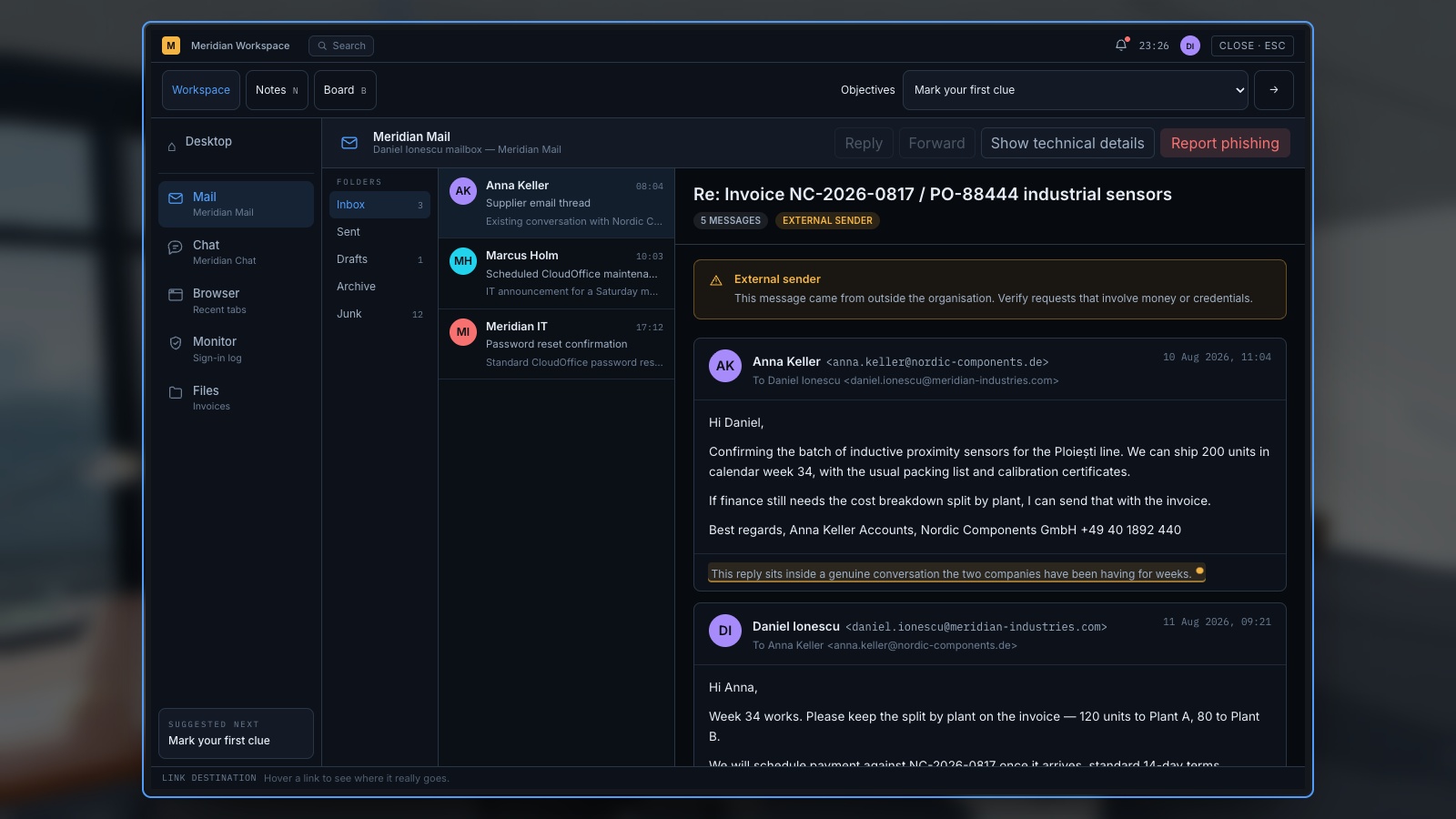
Phishing practice should examine what the requester wants, why it fits the recipient’s work and how the instruction can be checked. A polished invoice request can be more relevant to finance than a badly written prize message. The NIST Phish Scale considers human detection difficulty, including message cues and the fit between its premise and the recipient’s context.
Then change the channel. Make the same request arrive by phone, workplace chat or a QR code on a poster. The response should still involve checking the request through a trusted process. Learners do not need separate disconnected rules for every message format; they need to recognise when the same decision has appeared in different packaging.
Expand image · Game screenshot · English interface
- Read the requested action
Identify what the message asks you to do before judging its familiar name or appearance.
- Verify through known contacts
Use an established contact route to verify an unexpected request, even when the sender seems familiar.
Section sources: NIST Phish Scale User Guide
5. Make account security about the whole sign-in journey
Account training often stops at choosing a password. Add unexpected approval prompts, account recovery, fake sign-in pages and requests from someone claiming to be support. Have people explain what they would do when an approval arrives while they are not signing in. Include the location of the legitimate help desk and the permitted recovery process.
Use imaginary accounts during the exercise. Do not ask participants to reveal their passwords, recovery codes or personal account settings. If the organisation introduces a new authentication method, provide a guided onboarding path through its official interface. A game can introduce the decision; the organisation still has to make its real sign-in and recovery workflow understandable.
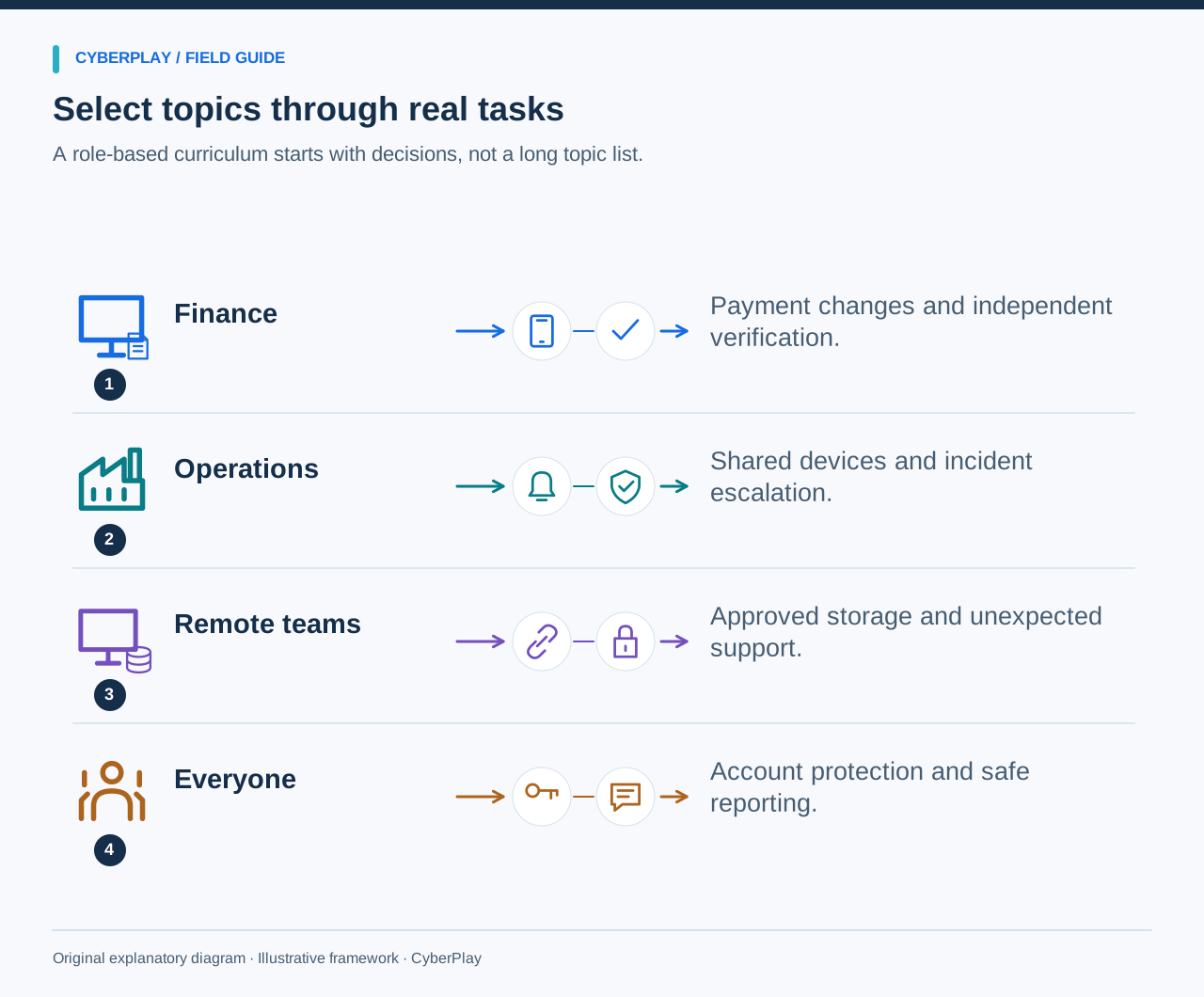
6. Connect data handling, remote work and AI use
A rushed request to share a file can appear in an office, a hotel or an AI chat window. The underlying questions remain useful: what information is involved, who or what will receive it, which tool is approved and who can authorise the action? Use fictional HR records, customer summaries or supplier proposals so the exercise resembles work without exposing real information.
For AI use, add an output-verification step and explain the limits of connected tools. A service approved for public marketing text may not be approved for confidential employee records. Keep this topic distinct from recognising a deepfake impersonator. One concerns the employee’s use of a tool; the other concerns the trustworthiness of an external request.
7. Include the physical workplace and shared devices
Choose examples that make the approved behaviour feasible. A visitor may be waiting while reception is busy; a contractor may arrive at a shift change; a colleague may need a shared terminal immediately. Ask participants how they can help without handing over a badge, leaving an account open or bypassing the relevant access process.
Do not turn the exercise into a confrontation contest. Give employees a polite phrase and a clear person to contact: “I can help you reach your host; please wait here while I confirm.” Have facilities confirm the route for an unexpected visitor and the response to a safety concern. Practical assistance and access checks should work together.
Expand image · Game screenshot · English interface
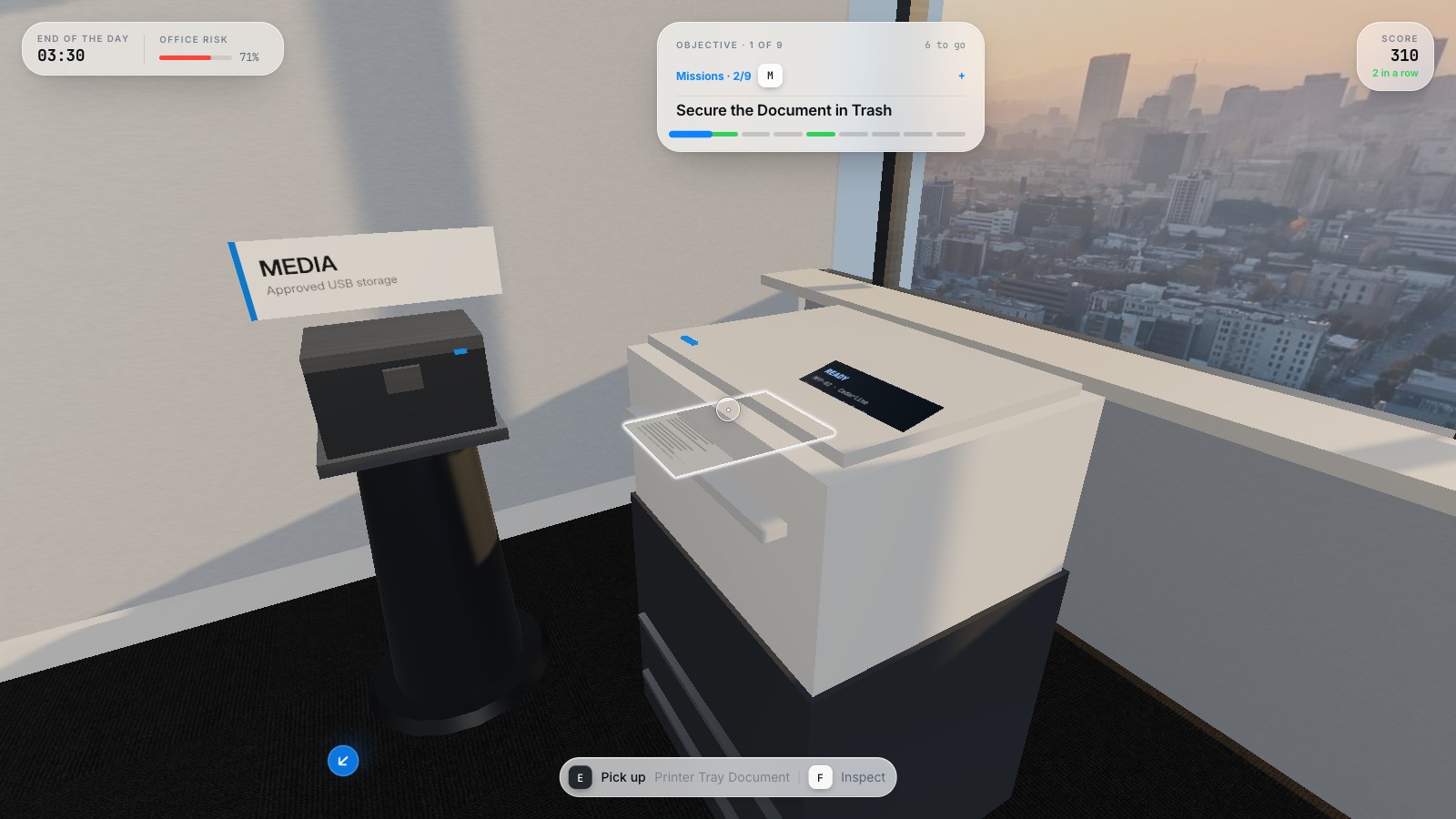
- Collect sensitive printed documents
Collect sensitive printouts promptly and check the output area before leaving shared printing facilities unattended.
- Use approved confidential disposal
Place unwanted sensitive documents in the organisation's approved confidential-disposal process, rather than an ordinary waste bin.
8. Choose priorities using a simple worksheet
For each candidate topic, record the audience, the consequential decision, how frequently it appears and the current barrier to a safe response. Use qualitative descriptions supported by local evidence. Do not create a numerical risk score unless the organisation already has a defined method for one. A topic deserves early attention when people must make the decision now and the safe route is unclear.
9. Match the practice format to the objective
Use a game when the learner can make meaningful choices and see relevant consequences. Use a role-play when the task involves a conversation, such as checking a support caller. Use a tabletop when several roles must coordinate. Use a short demonstration when employees need to find an unfamiliar reporting control. Select the format according to the action, rather than adding competition to every subject.
The CyberPlay topic directories provide entry points for phishing, QR phishing, passwords, social engineering, ransomware, physical security and remote work. Read the selected game’s actual description and controls before assigning it. A directory label does not establish that a game covers every policy detail in your curriculum.
10. Review topics when work changes
Check the curriculum after a new tool, new location, access change or significant process revision. Ask team owners whether the examples remain credible and whether the safe route still works. Use recurring questions and anonymised reports to identify where an explanation or process needs attention. Do not equate an increase in reports with poorer employee security without understanding what changed.
Connect the final topic list to a calendar with an owner and follow-up. Keep the common foundation compact, give high-consequence roles enough practice and retire obsolete scenarios. The result should be a curriculum in which employees can see why a topic belongs to their work and what action it helps them perform.
Put the decision into practice
Explore social engineering scenarios, then select one request that matches a real responsibility in your team.
Explore social engineering gamesSources and further reading
- Building a Cybersecurity and Privacy Learning Program, SP 800-50 Rev. 1 — NIST. Accessed 2026-09-13
- Four Easy Ways to Stay Safe Online — CISA. Accessed 2026-09-13
- NIST Phish Scale User Guide — NIST. Accessed 2026-09-13
Keep exploring
- Security awareness training plan: a 12-month calendar with practical activities
Use an editable 12-month security awareness training calendar with decision objectives, role-based activities, debrief questions, owners and useful review measures.
EN · 8 min read - Social engineering training exercises: rehearse impersonation and payment checks
Run practical social engineering exercises for fake IT support, supplier payment changes and voice impersonation, with dialogue cards, verification steps and debriefs.
EN · 8 min read - AI security awareness training: safer workplace decisions about tools and data
Build practical AI security awareness training for employees: approved tools, sensitive inputs, output verification, connected permissions and original decision cards.
EN · 8 min read - Password vs passphrase: protect your work accounts
Compare passwords and passphrases, avoid reuse, understand NIST guidance and use an approved password manager. Practise better account decisions in English.
EN · 8 min read - Is public Wi-Fi safe for work? Hotspots, HTTPS and fake portals
Learn when public Wi-Fi is suitable for work, how to verify hotel hotspots, spot fake login portals and certificate warnings, and choose an approved connection.
EN · 8 min read - Human risk management: how organisations turn evidence into action
Learn what human risk management means, how it helps organisations and where CyberSense learning insights fit. A practical guide with examples and an exercise.
EN · 8 min read