CyberPlay editorial team · Published · Updated · 8 min read
Guide and exercises in English
Expand image · Course video frame · English interface
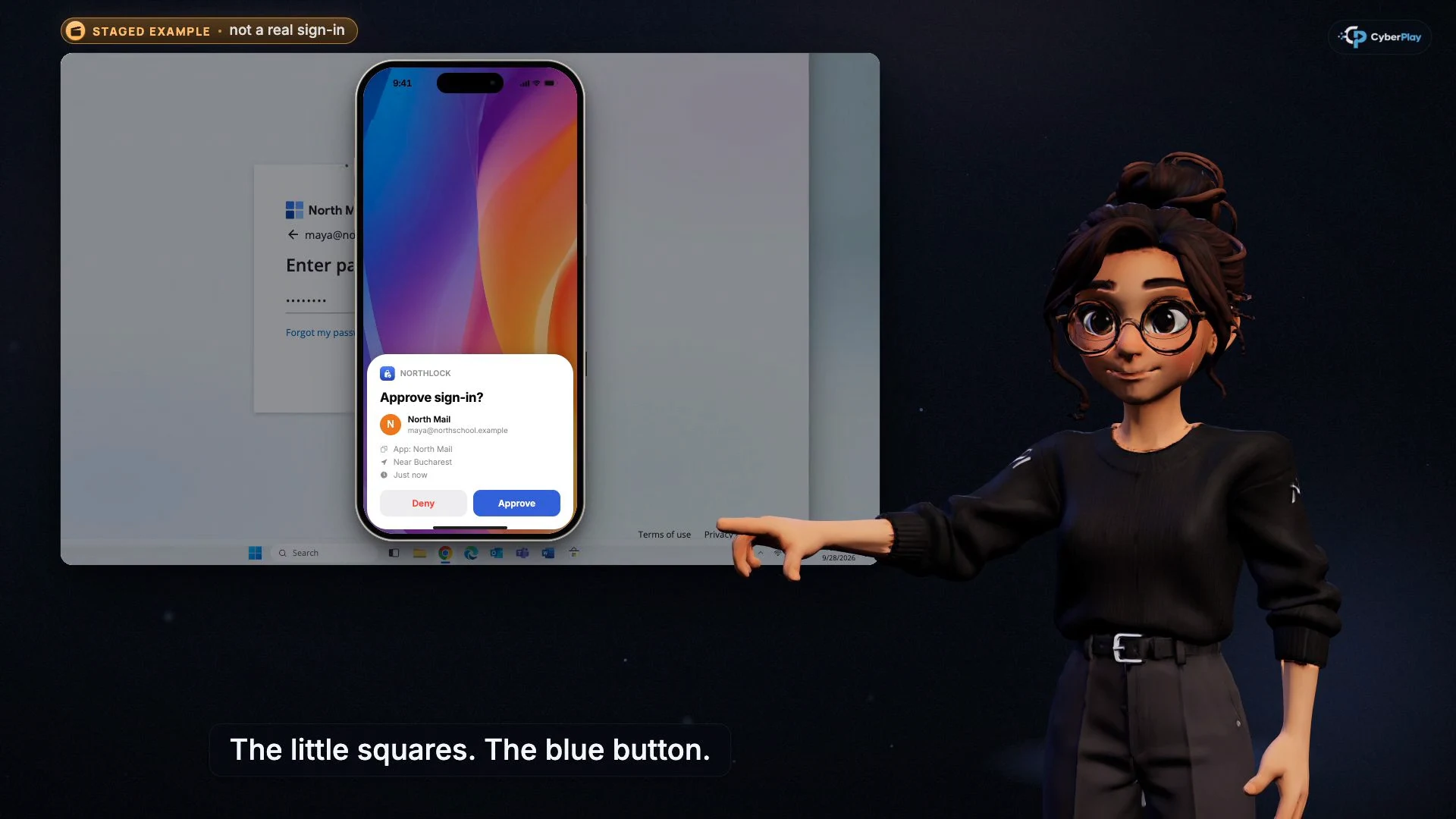
MFA remains valuable, but completing an extra sign-in check does not prove that the surrounding request is safe. Session phishing targets an authenticated session; device-code phishing tricks you into authorising a sign-in started elsewhere; consent phishing asks you to grant an application access. The employee decision is to verify the destination, who started the request and what the approval will permit.
This guide uses CyberPlay Courses to separate those three mechanisms, then connects them to Find the Fake Login. It is a practical lesson for people receiving document links, meeting invitations and support messages. The course videos are narrated in English or Romanian; the platform and selected game support all nine site languages.
What you’ll take away
- A real identity-provider page can display an unsafe device or application request.
- Enter a device code only for an approved flow you initiated and can verify.
- Read the application, publisher and requested permissions before granting consent.
- Report what you approved; changing a password alone may leave other access in place.
1. Teach the approval, not just the password box
Microsoft's September 2026 EvilTokens research describes device-code phishing in which a person enters an attacker-supplied code on Microsoft's real sign-in service. The legitimate page is part of the deception. In September 2026, the FBI also warned about OAuth consent phishing that redirects targets to a real provider permission screen. These are documented attack patterns, not reasons to abandon MFA.
For training, ask the learner to finish this sentence before clicking: “I am approving access for…”. An answer such as “the document told me to” leaves the central question unresolved. A useful lesson makes the device, application or session visible enough for the learner to explain the decision.
Section sources: Unmasking EvilTokens: Getting to the root of device code phishing · Malicious Cyber Actors Gain Access to Victim Accounts Through Consent Phishing
2. Compare the three mechanisms
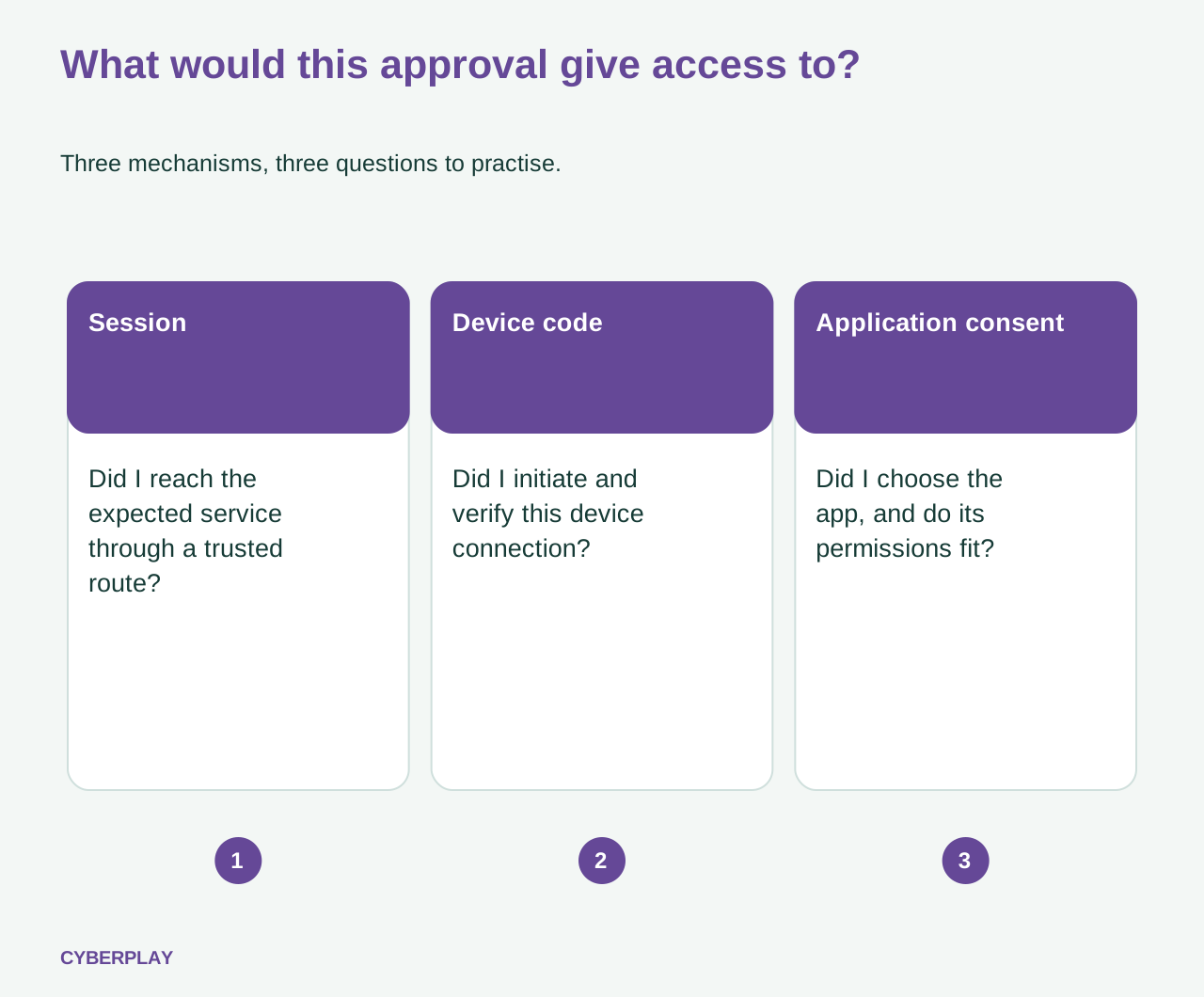
The terms describe different ways of obtaining access. Do not teach them as three names for a fake password page. Use this compact comparison first, then work through a separate example of each. The table is a training aid; actual containment depends on the service and the response team's findings.
| Mechanism | What the attacker seeks | Question before proceeding |
|---|---|---|
| Session-cookie phishing, often through an adversary in the middle | The authenticated session created during a relayed sign-in. | Did I reach the expected service through a trusted route? |
| Device-code phishing | Authorisation for a sign-in the attacker initiated. | Did I start this device connection, and can I verify its code and purpose? |
| OAuth consent phishing | Permissions for an attacker-controlled application. | Did I choose this approved app, and do these permissions match its task? |
Section sources: Resurgence of a multi-stage AiTM phishing and BEC campaign abusing SharePoint · Unmasking EvilTokens: Getting to the root of device code phishing · Protect against consent phishing
3. Session phishing: the extra check can be relayed
In an adversary-in-the-middle sign-in, a malicious intermediary relays the interaction with the real service and captures the resulting session material. A January 2026 Microsoft investigation describes an AiTM campaign followed by mailbox manipulation and further phishing. Its remediation guidance goes beyond resetting a password to include session revocation and checks for persistence.
For the employee, rehearse trusted navigation. If an unexpected document or message demands a sign-in, stop and open the approved application or saved portal independently. Confirm the item there or ask through a known contact. Do not keep completing a suspicious flow because an MFA prompt appeared, and do not override a passkey or password-manager mismatch merely to make the page work.
Section sources: Resurgence of a multi-stage AiTM phishing and BEC campaign abusing SharePoint
4. Device-code phishing: check who started the connection
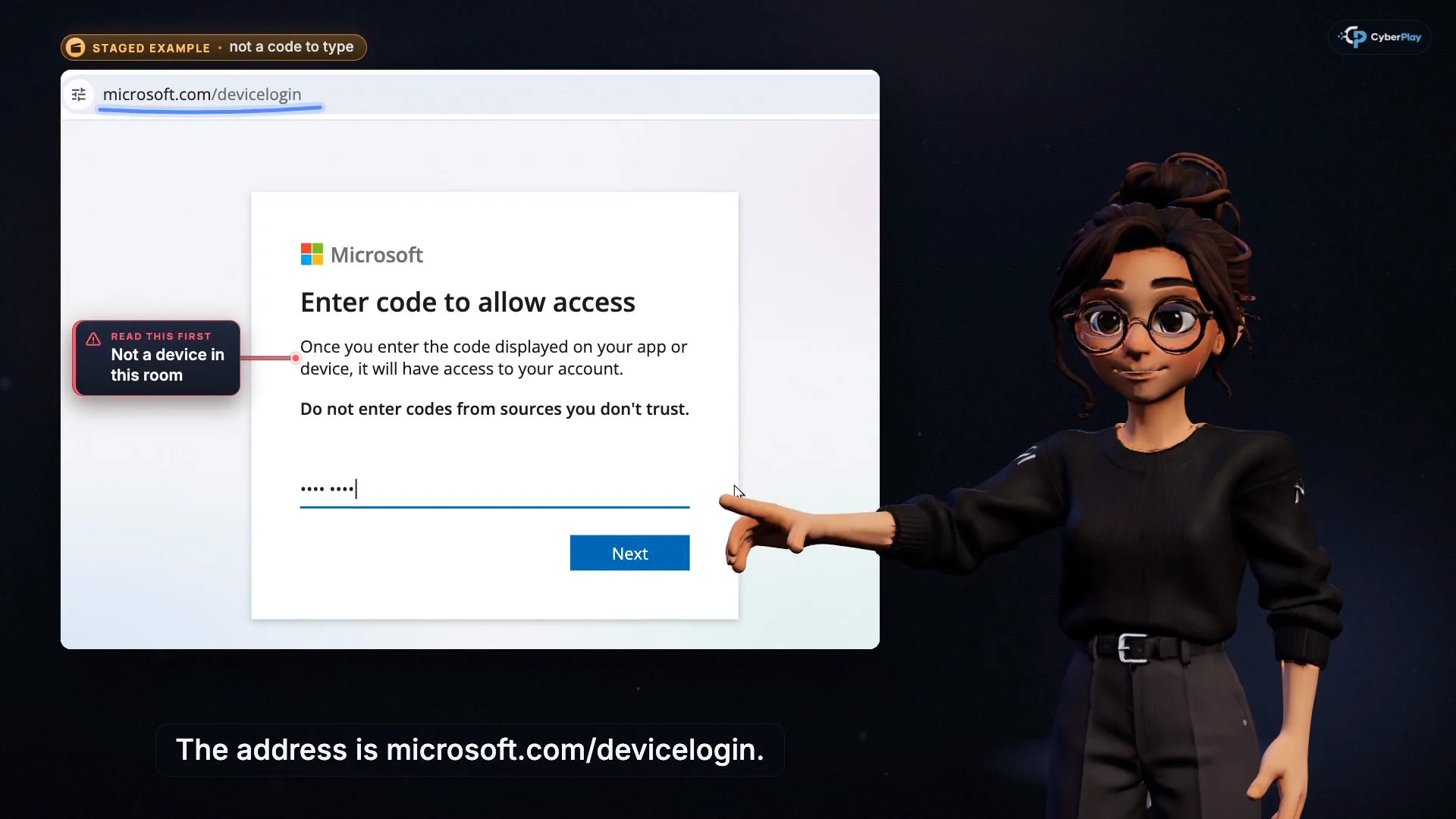
Device-code sign-in has legitimate uses, including devices with limited input. In the abusive flow described by Microsoft, the attacker starts the request and passes its code to the target. Entering and confirming that code can authorise the attacker's session without handing them the password. Inspecting only the provider's web address misses that difference.
Use two fictional cards in a discussion. On one, a learner has just started connecting an approved meeting-room device and can see its code. On the other, a chat contact provides a code to “unlock a document”. Ask what initiated each action and which device or application will receive access. An unsolicited code is not a document password. Cancel and verify the request through support; do not enter it experimentally.
Expand image · Course video frame · English interface
- A real domain is only one check
The provider’s genuine page does not prove that you initiated the device authorisation.
- Check where the code came from
Only continue with a device flow you started for your own known app or device.
Section sources: Unmasking EvilTokens: Getting to the root of device code phishing
5. Consent phishing: read what the app receives
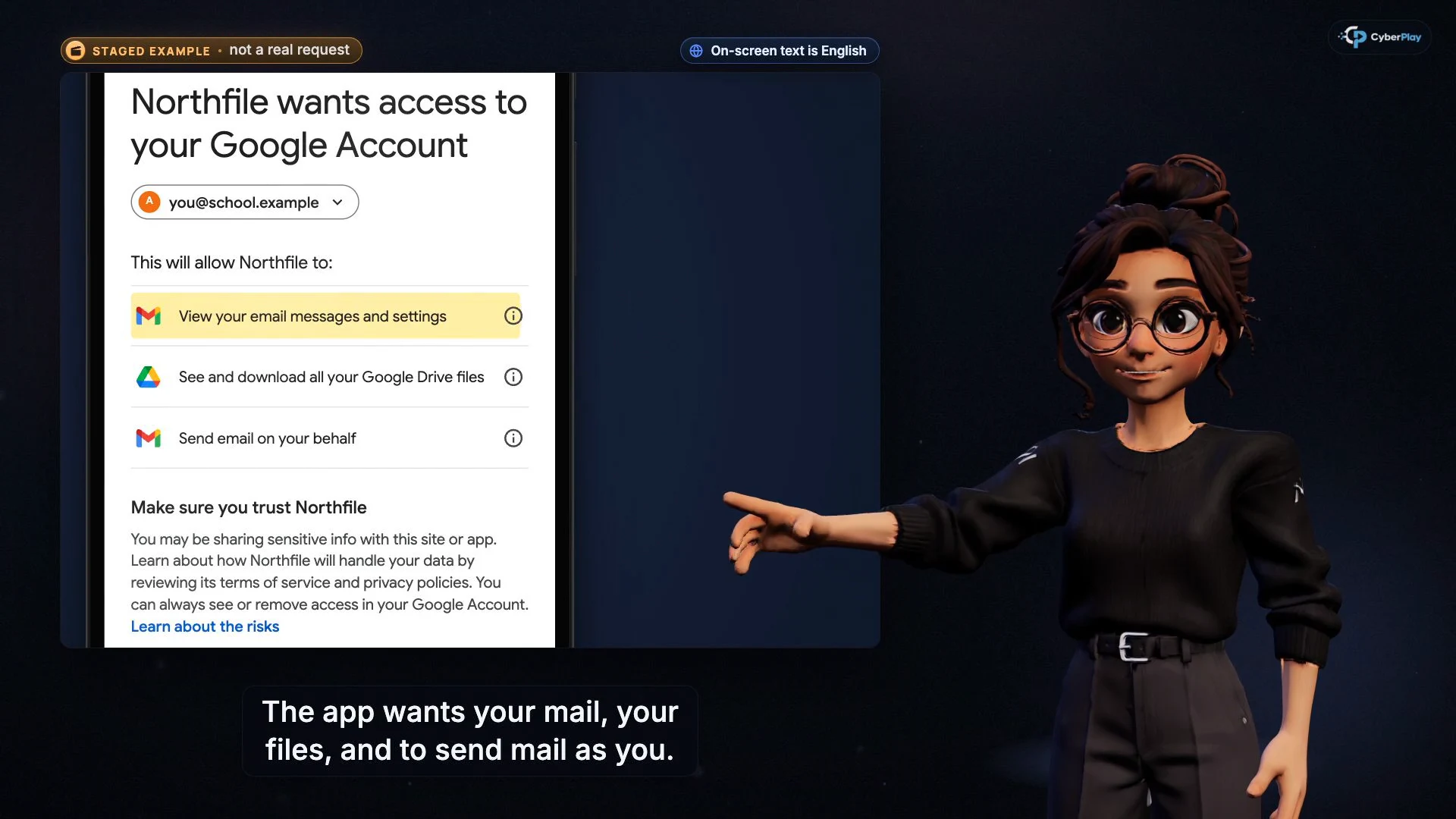
OAuth consent lets an application request permission to access information or perform actions. Microsoft advises checking the app, publisher and requested permissions; a verified publisher still does not remove the need to evaluate the request. The FBI's September 2026 warning explains why a password change does not itself remove a malicious app's granted access.
Try an original comparison: an approved scheduling tool requests the access documented in its rollout, while an unexpected “file viewer” asks to read mail and retain access. Have the learner name the mismatch, then explain how to check the application through the organisation's approved software route. Familiar branding and a genuine permission page do not answer whether this app should receive those permissions.
Expand image · Course video frame · English interface
- Identify the application
Confirm that this is an app you intentionally chose and are authorised to use.
- Read the scope of access
Mail, files and sending messages are separate powers; a request to view one document does not justify all of them.
Section sources: Protect against consent phishing · Malicious Cyber Actors Gain Access to Victim Accounts Through Consent Phishing
6. Explain what stronger authentication changes
Passkeys and FIDO2 security keys use credentials bound to the intended service, providing resistance to phishing that relays a password or code through a lookalike site. Microsoft describes this as origin-bound public-key authentication. Encourage employees to use the method approved by their organisation and to contact support if an unexpected page asks them to downgrade to another method.
Keep the lesson's boundaries clear: stronger authentication does not decide whether a requested app permission serves a legitimate business purpose. Administrators also need suitable device-flow, application-consent and session controls. Employees should not change those policies during an awareness exercise. Their job is to recognise the unresolved approval, stop and provide useful information to the person responsible.
Section sources: Authentication methods in Microsoft Entra ID: passkeys (FIDO2) · Protect against consent phishing
7. Connect the Courses with Find the Fake Login
Use Do not finish it there for session phishing, A real page can still be the wrong request for device codes, and Do not allow an app you did not choose for consent. Each course pauses at five answer checkpoints before the explanation. Review the reason behind an answer, especially when a learner uses “the page was real” as the only justification. Videos are available in English and Romanian, with access governed by the account and plan.
Then open Find the Fake Login. Its actual scenarios include a helpdesk chat supplying a device code, an unexpected application requesting mail and file access, and a legitimate internal calendar application. Compare the malicious and legitimate consent examples so the learner practises a considered decision. These are fictional, browser-only scenarios; the game does not inspect a real account or test your organisation's identity configuration.
8. Explain the safe decision in a new scenario
Use the case below after the course and game. Keep it as a tabletop discussion with fictional services; no real device code, application consent or account is needed. Ask each learner to identify the missing evidence before reading the answer.
9. Report the action you took, then let responders scope it
Report promptly if you completed a suspicious sign-in, entered a supplied device code or approved an unexpected app. State the time, account, starting message and action you took. For an app, include its displayed name and permissions if already available. Preserve the message through the approved reporting route; do not reopen the request to collect more evidence.
Tell responders whether you entered credentials, approved a device connection or granted application permissions. Those differences affect which sessions, tokens, apps and account changes need investigation. Do not assume that closing the browser or changing the password completes recovery. The response owner should confirm the relevant containment and follow-up under the service's procedures.
For the next practice session, change the lure but keep the approval mechanism. Compare explanations across attempts and record unresolved questions for coaching. Course completion and game decisions show participation and performance in those exercises; they do not prove that a real account is secure or that future phishing will fail.
Section sources: Resurgence of a multi-stage AiTM phishing and BEC campaign abusing SharePoint · Malicious Cyber Actors Gain Access to Victim Accounts Through Consent Phishing
Practice account-access approvals
Use Find the Fake Login to investigate a device-code request and compare legitimate and malicious app permissions after the Courses.
Play Find the Fake LoginSources and further reading
- Unmasking EvilTokens: Getting to the root of device code phishing — Microsoft Security. Accessed 2026-10-03
- Resurgence of a multi-stage AiTM phishing and BEC campaign abusing SharePoint — Microsoft Security. Accessed 2026-10-03
- Malicious Cyber Actors Gain Access to Victim Accounts Through Consent Phishing — FBI Internet Crime Complaint Center. Accessed 2026-10-03
- Protect against consent phishing — Microsoft Learn. Accessed 2026-10-03
- Authentication methods in Microsoft Entra ID: passkeys (FIDO2) — Microsoft Learn. Accessed 2026-10-03
Keep exploring
- Cyber security awareness for universities: a course plan
Build university cyber security awareness with student induction, staff and research pathways, CyberPlay Courses, practical games and a campus reporting exercise.
EN · 10 min read - How to spot a fake login page—even when it uses HTTPS
Check a login page’s real address, password-manager signals and request context. Learn why HTTPS is not proof of trust, with an English practice exercise.
EN · 8 min read - Unexpected MFA request? What to do when you did not sign in
Received an MFA prompt you did not initiate? Learn when to deny it, verify a support call, report an accidental approval and practise the decision in English.
EN · 8 min read - Phishing training games: practise the decisions behind a suspicious message
Use phishing training games to rehearse inspection, independent verification and reporting. Includes a fictional supplier message and a practical session plan.
EN · 8 min read - Prompt injection training for employees: check what your AI assistant can do
Teach employees to check AI actions, protect work data and report mistakes. Pair CyberPlay Courses with Data Dash practice and a practical approval checklist.
EN · 8 min read - Deepfake voice fraud training: verify the request before money or access
Build a callback routine for AI voice scams, executive impersonation and helpdesk requests. Connect CyberPlay Courses with practical game scenarios.
EN · 8 min read