CyberPlay editorial team · Published · Updated · 9 min read
Guide and exercises in English

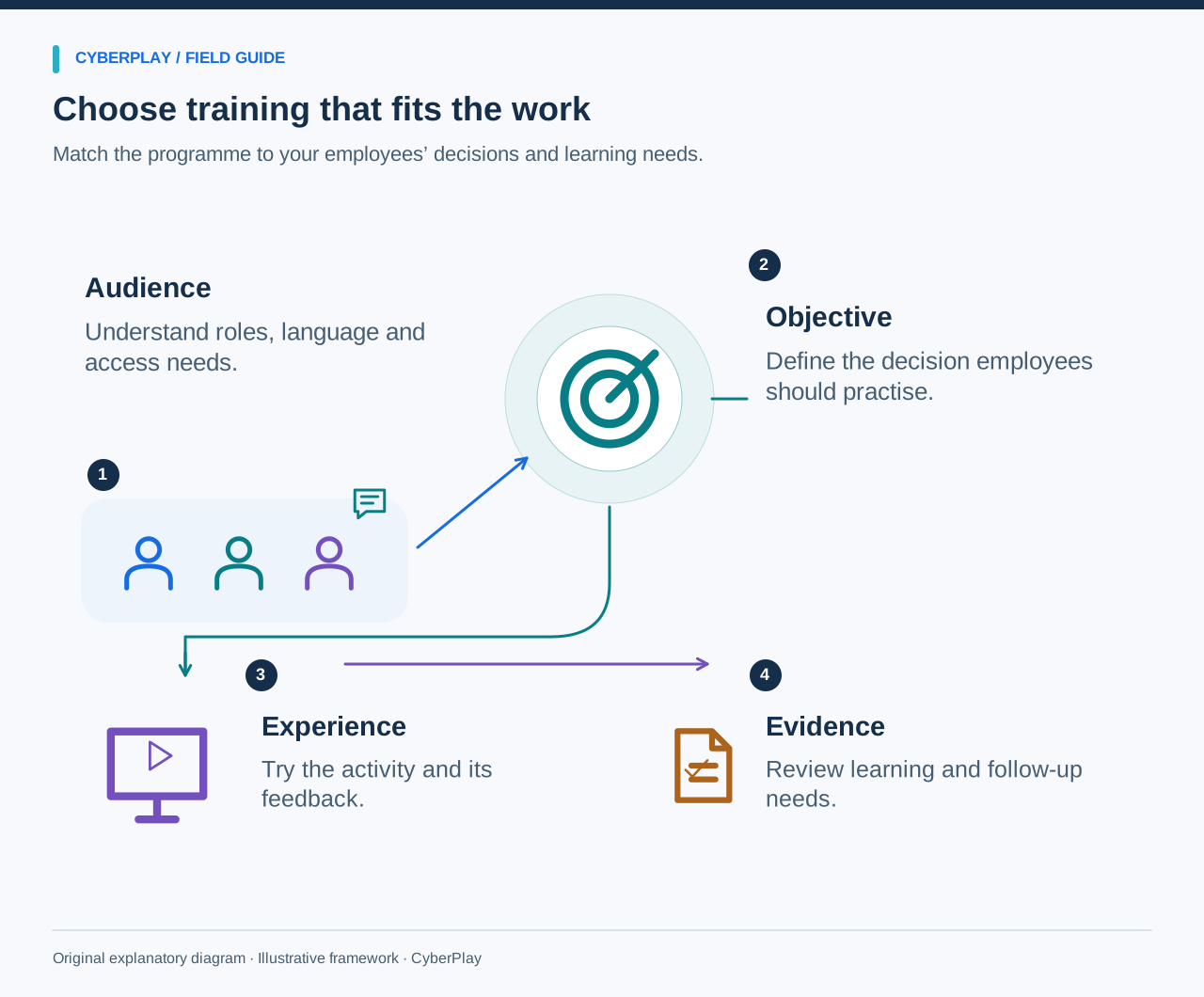
Security awareness training for employees should help people handle the decisions that appear in their work: checking an unexpected request, protecting an account, sharing information appropriately and reporting a concern. Choosing a programme means examining how those decisions are taught and practised, alongside the practical work of making activities available and supporting the people taking them.
Start with a small set of needs and test a complete experience before committing to a larger rollout. This guide provides an original workplace scenario, a programme-selection checklist and a pilot approach for comparing learning and operational fit. It applies to teams with different roles, languages and working patterns. A useful choice should be understandable to the learner, manageable for the programme owner and honest about the evidence it produces.
What you’ll take away
- Define the workplace decisions you want employees to practise before comparing providers.
- Test the complete activity, including feedback, language, controls and the reporting connection.
- Inspect actual pilot records and administrator workflows rather than relying on feature labels.
- Use demonstrated suitability and explicit limits to decide whether to expand the programme.
Start with the action employees need to take
Write a concrete objective for each priority audience. Finance staff should verify changed payment instructions through the approved process. Everyone should be able to find the reporting route. Managers should know how to support an employee who pauses a questionable request. These outcomes give a buyer something observable to inspect in a sample lesson.
NIST SP 800-50 Rev. 1 describes an ongoing learning programme tailored to organisational needs, with evaluation and improvement. Apply that principle by asking where employees currently encounter uncertainty and which processes need reinforcement. General awareness, specialist technical instruction and training for people with particular responsibilities may require different activities; one attractive course need not serve every purpose.
Section sources: Building a Cybersecurity and Privacy Learning Program, NIST SP 800-50 Rev. 1
Look inside the learning activity
Ask to complete an activity as an employee would. Notice whether it explains the situation, lets the learner make a meaningful choice and provides feedback about the consequence. A video can introduce a concept, a role-play can rehearse a conversation and a game can provide repeated decisions. Select the format that makes the intended action understandable and available for practice.
Inspect the wrong answers as carefully as the right one. Useful feedback explains why the choice matters and offers a workable alternative. If an activity merely awards points for recognising a label, ask how the learner will connect that result to a workplace task. Also check whether employees can pause, revisit an explanation or ask for help when they remain unsure.
Match the experience to the intended audience
An office administrator, a remote worker and an employee using a shared terminal may face different requests and have different ways to take part. Ask representatives of the intended audience whether the sample feels plausible, whether they understand their role and whether the safe action is possible in their workplace. Keep the scenario fictional while making its process recognisable.
Check the baseline knowledge expected by the content. A newcomer may need a short explanation before a challenge; an experienced payment approver may benefit from a more ambiguous request. The NCSC Top Tips for Staff package provides an example of a non-technical introduction covering practical basics. Its published audience and access information can help buyers articulate what they need from an introductory resource.

Expand image · Game screenshot · English interface
- Review devices and storage
Check which devices and storage locations hold work information, and identify any access or sharing questions.
- Use approved work channels
Keep work communication and files in approved channels and storage, even when personal alternatives seem more convenient.
Section sources: Top Tips for Staff: help your staff keep your organisation safe online
Test language and accessibility throughout the experience
Check instructions, answer choices, explanations, navigation and error messages in each required language. A language selector on the platform does not establish that a particular activity is fully translated. Ask a learner to explain the safe action in their own words after completing it; this can reveal unclear phrasing that a quick visual review misses.
Test on the actual workplace devices and connection. Check keyboard use, readable text, contrast, sound alternatives and whether time limits create avoidable barriers. Do not make a personal smartphone or private email account an unstated condition of participation. Where an activity cannot meet a learner’s needs, establish an equivalent way to practise the same decision before choosing it for the whole group.
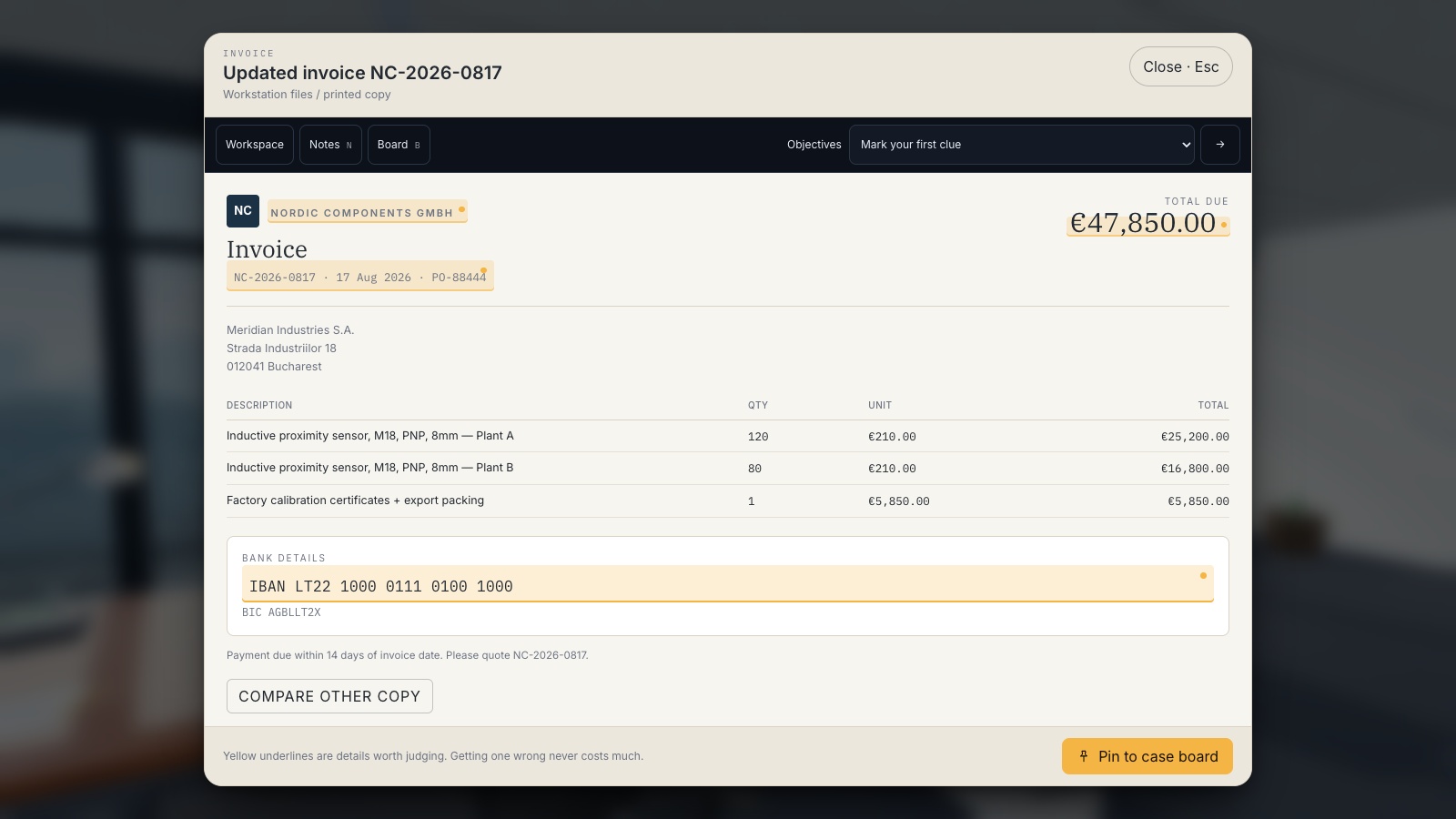
Try an original supplier-change scenario
Use this fictional example during a provider demonstration or internal pilot. An employee expects an invoice from a regular supplier. A message arrives with the correct order reference but requests a new payment account and supplies a new telephone number for confirmation. The normal supplier record and approval process are available to the employee.
The FBI recommends independent checks for payment and account changes. The activity should help the learner practise your implementation of that check. A familiar sender, expected amount or convincing explanation is not enough to authorise a new payment destination. The learner needs a route to verify and complete legitimate work safely.
Expand image · Game screenshot · English interface
- Compare the changed details
Check which payment details changed and whether the request matches the expected invoice and work.
- Compare with trusted records
Compare with a trusted invoice, then verify changed bank details through the supplier contact already on record.
Section sources: Business Email Compromise
Compare programmes with an evidence checklist
Use the same checklist for every option, including an internally facilitated approach. Ask for a demonstration or document that answers each question. Record the exact activity and commercial plan tested, because a capability may exist only in part of a catalogue or at a different service level. Mark an untested item as unresolved rather than assuming it is included.
| Selection question | Evidence to request | Reason it matters |
|---|---|---|
| Does the activity teach a relevant decision? | A complete sample with learner choices and feedback. | The method must connect to the intended workplace action. |
| Can the intended audience participate? | A device, language and accessibility pilot. | A suitable activity must be usable by the people assigned to it. |
| Can it connect to our procedures? | A demonstration of the local reporting and verification instructions. | General advice needs a workable route in the organisation. |
| What does an administrator actually manage? | A walkthrough of invitation, assignment and follow-up tasks. | Operational effort affects whether the programme can be maintained. |
| What do the records mean? | A sample result or export with field definitions. | Completion and assessed performance answer different questions. |
| What is included in the agreement? | The proposed users, term, support, functions and exit arrangements. | The buyer needs a clear scope for the evaluated service. |
Pilot the administrator’s work as well
Ask the programme owner to perform the tasks needed for the proposed rollout: setting up the intended group, communicating access, selecting an activity, handling a missed session and reviewing results. Use the exact proposed plan and permissions. A demonstration delivered by a provider’s specialist may conceal steps that your administrator will need to perform alone.
Inspect the difficult cases. What happens when someone joins late, changes role, cannot sign in or leaves the organisation? Can an authorised owner resolve the issue, and what support is available? Check any required import, export or integration using a small approved test dataset. Do not treat a feature named in a brochure as evidence that it works with your particular workflow.
Check evidence, access and data handling
Ask which records the programme creates and what each field represents. A completion record shows that an activity was finished under its rules. A game score describes performance in that game. A discussion may produce useful observations without an individual assessment. Keep those distinctions visible when reporting to managers, and ask how a later changed scenario could examine application separately.
Review who can see individual results, how access follows organisational roles and what retention or deletion arrangements apply. Use fictional information for the pilot where possible. Keep a separate improvement log for problems such as an outdated supplier contact or unclear reporting route. Those observations may lead to important changes even when they are not captured in a learner score.
Run a small pilot with explicit success conditions
Choose a group that represents the intended roles, languages and devices. Before starting, agree what you need to observe: learners can access the activity, explain the target decision and find the reporting route; the administrator can perform the required tasks and interpret the resulting records. Add any essential organisational requirements to the same list.
Let participants attempt the sample before coaching them. Then collect feedback about the explanation, controls and relevance. After the debrief, present a changed situation to see how they apply the principle. This is a practical suitability check, not proof of reduced incidents or a controlled evaluation of causal effect. Document limitations and assign any required fixes before expanding.
Expand image · Game screenshot · English interface
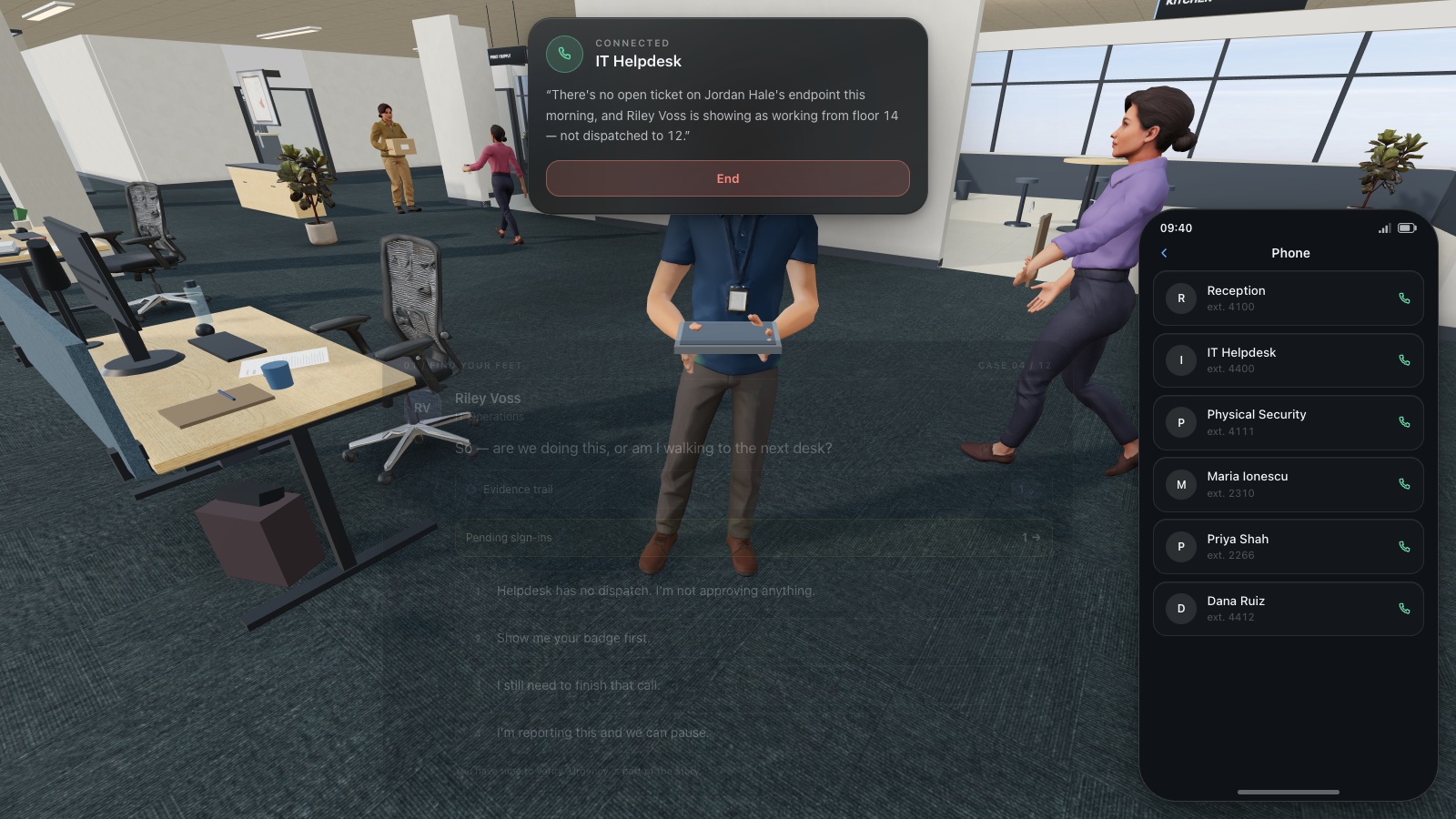
- Find the existing directory
Use the organisation's established helpdesk directory to find a trusted contact before continuing a sensitive request.
- Do not reuse supplied numbers
A number supplied by the caller is part of the request and cannot independently verify it.
Choose the next step from demonstrated fit
Review the pilot against the success conditions and the proposed agreement. Expand when the essential learning and operating needs are met. Resolve material gaps before a broad rollout, or choose a different format for the affected audience. A small facilitated session can be a sensible starting point when it fits the objective; larger coordination needs may justify dedicated administration.
CyberPlay’s phishing collection provides a starting point for testing interactive practice. Select a relevant game, verify its actual language and controls, and connect its decisions to your organisation’s own procedure during the debrief. Judge the complete experience alongside the records and management features you need. Once that fit is established, use a training plan to organise ongoing delivery and improvement.
Put the decision into practice
Explore the relevant CyberPlay games, choose a suitable challenge, and discuss how its decisions connect to your own workplace procedures.
Explore practice gamesSources and further reading
- Building a Cybersecurity and Privacy Learning Program, NIST SP 800-50 Rev. 1 — NIST. Accessed 2026-09-13
- Business Email Compromise — FBI. Accessed 2026-09-13
- Top Tips for Staff: help your staff keep your organisation safe online — National Cyber Security Centre. Accessed 2026-09-13
Keep exploring
- Security awareness courses: build a programme that connects learning with practice
Build a security awareness programme with short video courses, realistic games and knowledge checks. See role-based examples and what each result can prove.
EN · 8 min read - NIS2 security awareness training: a practical programme and evidence checklist
Plan NIS2 security awareness training by role, connect activities to risks, and keep useful evidence. Includes management and employee training distinctions.
EN · 8 min read - Security awareness training plan: a 12-month calendar with practical activities
Use an editable 12-month security awareness training calendar with decision objectives, role-based activities, debrief questions, owners and useful review measures.
EN · 8 min read - Security awareness games for employees: how to choose and use them
Choose security awareness games that teach useful workplace decisions. Compare formats, run a sample session, and use a practical evaluation checklist.
EN · 8 min read - Password vs passphrase: protect your work accounts
Compare passwords and passphrases, avoid reuse, understand NIST guidance and use an approved password manager. Practise better account decisions in English.
EN · 8 min read - Ransomware warning signs: an employee’s first-response checklist
Files suddenly unreadable or renamed? Learn ransomware warning signs, safe first actions and how to give IT a useful report. Practise the response in English.
EN · 8 min read