CyberPlay editorial team · Published · Updated · 8 min read
Guide and exercises in English
When a supplier asks you to change its bank details, pause the change and compare it with the approved supplier record. Verify the request through a contact already known to your organisation, then use the normal vendor-record and payment approvals. A familiar email address, invoice number or thread does not authorise a new account.
This guide is for accounts payable, procurement and colleagues who forward supplier requests. It provides a complete change workflow and invoice-comparison worksheet. The point is to establish where a payment should go, not to guess whether a document looks fraudulent. Real account changes can proceed once the checks and approvals are complete.
What you’ll take away
- Verify account changes through an independently sourced, established supplier contact.
- Compare the proposed details with the controlled supplier record, not just another attachment.
- Keep verification, supplier-record updates and payment release as explicit responsibilities.
- If money has already been sent, alert finance and the bank immediately through trusted channels.
Use this sequence before changing payment details
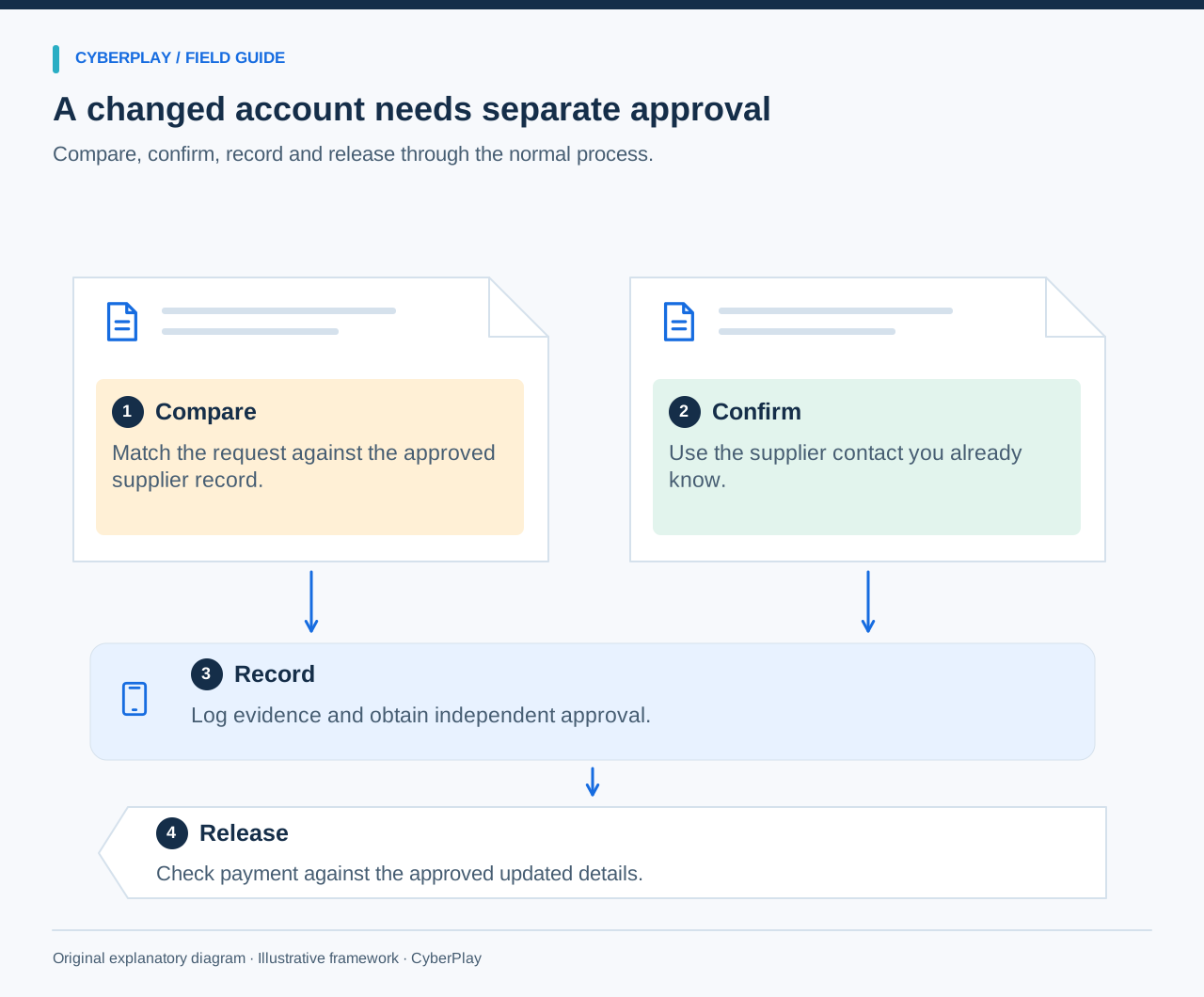
First identify the requested change and hold the affected payment or record update according to policy. Retrieve the approved supplier details from your existing system. Call the established supplier contact, record the confirmation and route the change to the authorised record owner. Apply the required independent approval before releasing payment.
The FBI advises verifying changes in account numbers or payment procedures. Dutch police guidance also recommends comparing the account with your own administration and calling a previously known number. Treat the sequence here as a practical control design to align with your organisation, not a universal legal rule.
- Pause the affected change and note the invoice reference.
- Compare the request with the controlled supplier record.
- Verify through the known supplier contact and record the outcome.
- Have the authorised owner update the record with the required approval.
- Release payment only after the approved details and invoice agree.
Section sources: Business Email Compromise: prevention and response · Tips to prevent digital invoice fraud
Why a real sender and a real thread can still mislead
Business email compromise, or BEC, can involve abuse of an actual mailbox. An attacker may already know the supplier, amount and payment date. A reply in a genuine conversation can therefore carry a new fraudulent instruction. Checking spelling is useful for noticing some deception, but it cannot authenticate a payment change.
Separate two questions: “Is this purchase expected?” and “Has this account change been authorised?” A correct purchase order answers the first. It does not answer the second. The French public assistance service Cybermalveillance.gouv.fr describes the same payment-diversion pattern as transfer fraud or a false RIB, where account details are substituted in an expected transaction.
Section sources: Business Email Compromise: prevention and response · What to do about transfer fraud or false bank details
What the reported losses tell us—and what they do not
The FBI IC3 2025 Annual Report records 24,768 BEC complaints and US$3,046,598,558 in reported losses for that category. Those are complaints submitted to IC3 during 2025, not a count of every BEC incident worldwide and not a forecast of the loss a particular organisation will suffer.
The report’s data notes say classifications and loss figures can change with analysis, and duplicate reports are possible despite efforts to deduplicate losses. Use the statistic to explain why payment controls deserve attention. It does not establish that one callback policy, vendor product or training game would have prevented a specified proportion of loss.
Section sources: 2025 Internet Crime Report, pages 7–8 and 62
Compare two invoice records without treating either as proof
Use this fictional worksheet in a team discussion. Both documents describe the same delivery, amount and invoice number. Only the payment destination and contact instruction change. Account A and Account B are labels, not usable banking details; the example address accounts@northstar-supplies.example is reserved for illustration.
The established record is your comparison point, but it must itself be maintained and access-controlled. An old email forwarded by the requester is not automatically an approved record. After identifying the mismatch, write “change requires verification” rather than “confirmed fraud”. The supplier could have a legitimate reason to change banks.
| Field | Approved record | New request | Decision |
|---|---|---|---|
| Supplier | Northstar Supplies | Northstar Supplies | Matching name provides context. |
| Invoice / amount | NS-1048 / €12,400 | NS-1048 / €12,400 | Expected work; no approval of the change. |
| Payment destination | Account A in vendor record | Replace with Account B | Hold and verify the change. |
| Contact route | Existing purchasing contact | New number in email signature | Use the established contact. |
| Effective date | No change recorded | Use today for all invoices | Clarify scope before any update. |
| Approval | No change approval recorded | “Already agreed with your manager” | Verify through the normal approval system. |
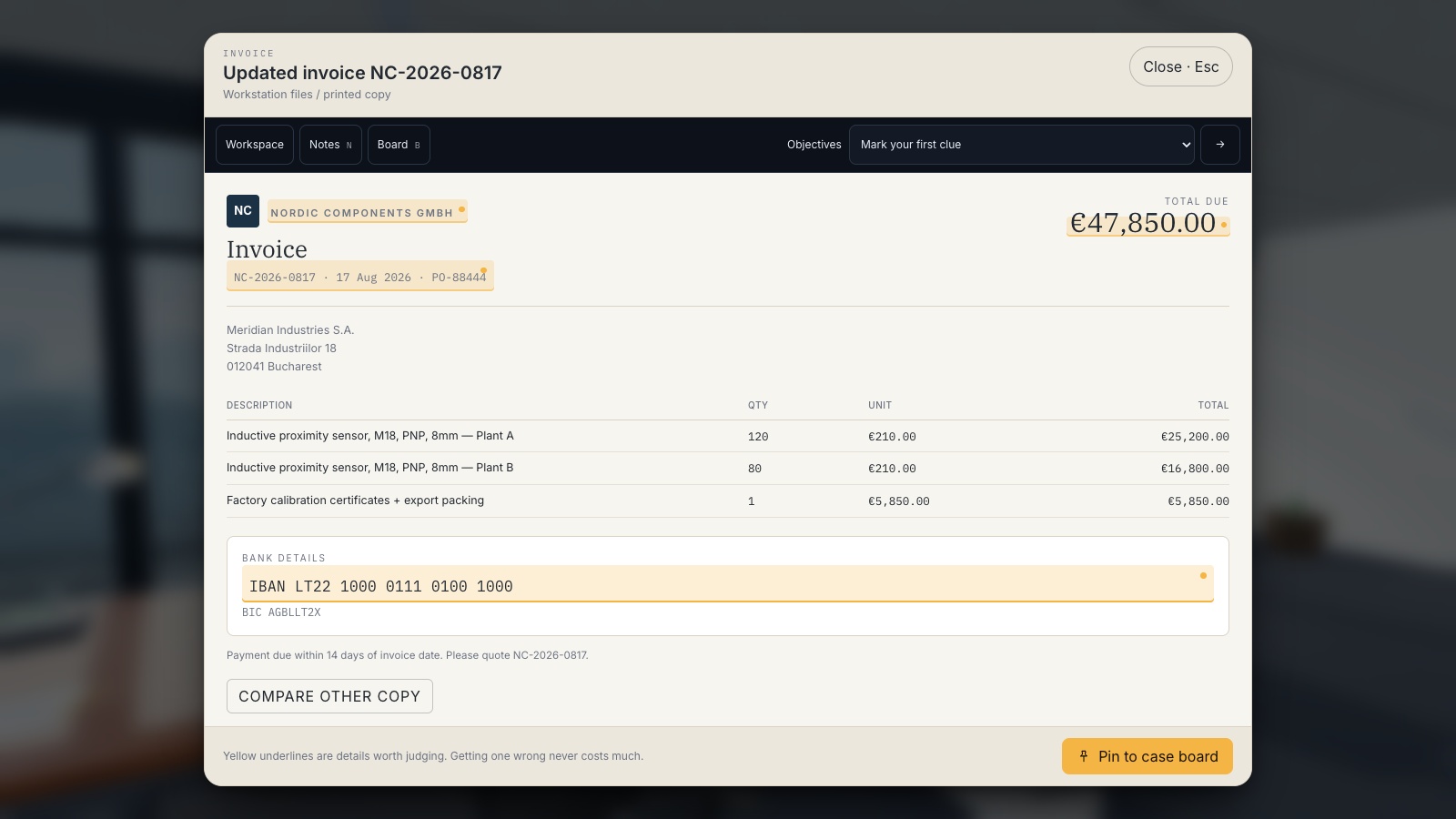
Expand image · Game screenshot · English interface
- Compare the changed details
Check which payment details changed and whether the request matches the expected invoice and work.
- Compare with trusted records
Compare with a trusted invoice, then verify changed bank details through the supplier contact already on record.
Make the supplier callback establish something independent
Use a number from the controlled supplier record or another contact route your organisation established before this request. Do not use a replacement number from the same message, its attachment or a caller who contacts you first. Ask the known contact to confirm that a change was requested, the relevant account details, when it takes effect and which invoices it covers.
Record who you reached and how that contact was selected. If the person cannot confirm the change, is unavailable or redirects you to an unverified contact, keep the change on hold and escalate. A deadline, manager’s name or reassuring reply is not a substitute for evidence. If records are outdated, use the approved supplier-onboarding or contact-revalidation process.
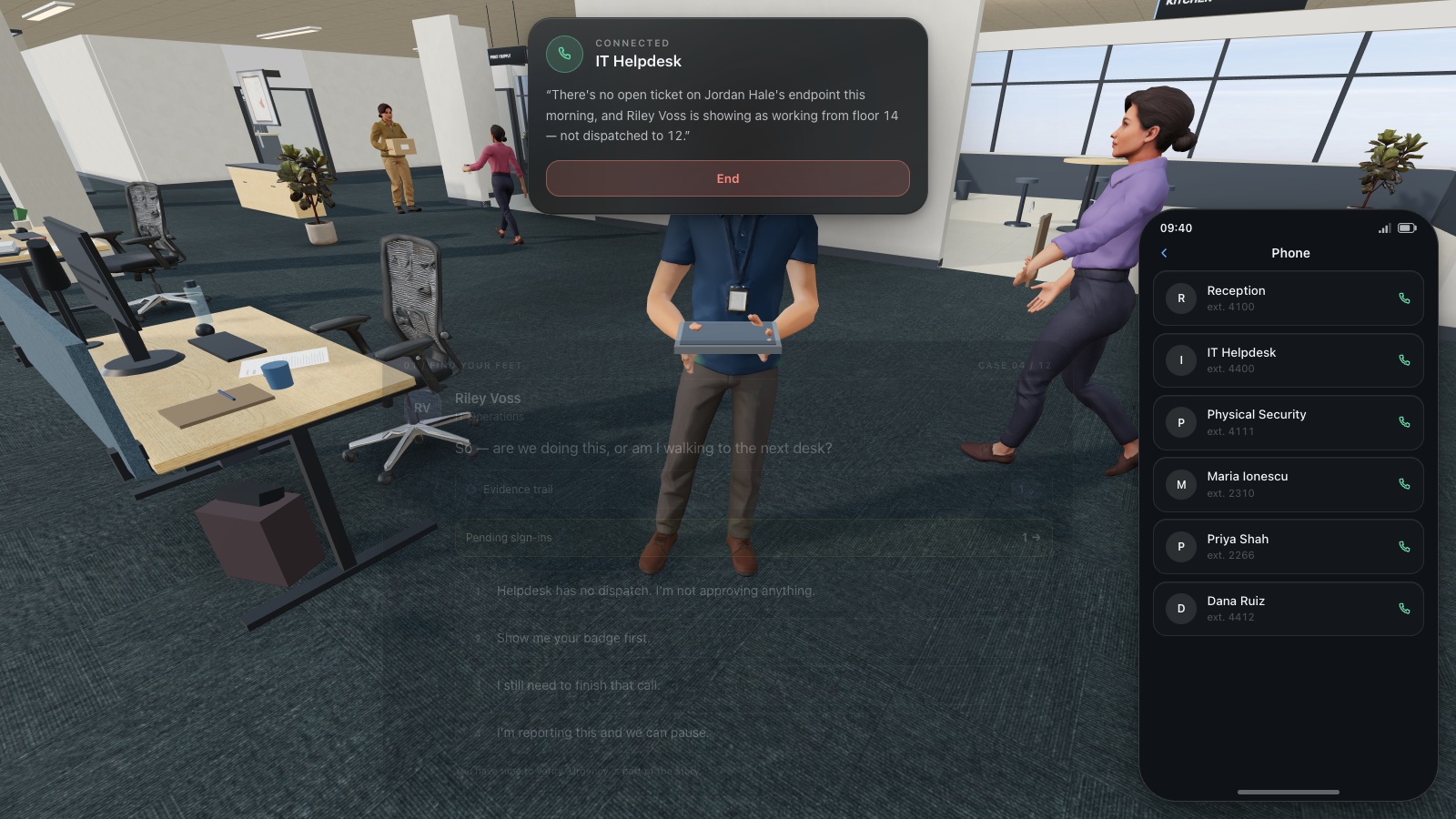
Expand image · Game screenshot · English interface
- Find the existing directory
Use the organisation's established helpdesk directory to find a trusted contact before continuing a sensitive request.
- Do not reuse supplied numbers
A number supplied by the caller is part of the request and cannot independently verify it.
Section sources: Tips to prevent digital invoice fraud · What to do about transfer fraud or false bank details
Keep a complete supplier-change record
The person who spots the request may not have permission to alter the vendor master or release money. Assign those responsibilities explicitly. An independent approver should review the verification evidence and the entered payment details, not just click through a notification saying someone else has checked.
Use this record in the approved finance system or adapt it as a worksheet. Store account information with appropriate access restrictions. Link evidence rather than copying sensitive banking details into broad chat channels. Include failed verification attempts so that a colleague cannot accidentally restart the same request as if it were new.
| Field to complete | What to record |
|---|---|
| Request and scope | Supplier ID, invoice references, requested change and effective date. |
| Trusted source | Approved record location and the contact route used. |
| Verification | Date, person reached, authority and confirmed details. |
| Exceptions | Unanswered questions, failed callback or conflict with existing information. |
| Record owner | Authorised person who will update the supplier data. |
| Independent approval | Approver, evidence reviewed and approval reference. |
| Payment release | Final destination checked against the approved updated record. |
| Outcome | Accepted, rejected or held, with owner and next action. |
If the payment has already been sent
Alert the finance or treasury owner and the bank immediately using their established contacts. Explain that the transfer may be fraudulent and ask the bank about recall or other protective steps. Provide the payment reference, time, amount and destination through the bank’s approved channel. Do not wait for a complete technical investigation before raising the financial concern.
Also notify your security team, preserve the original messages and payment records, and follow the organisation’s incident procedure. Recovery is not guaranteed. Do not send a second “correction” payment to a new account or negotiate through the suspected conversation. Finance, security and legal owners can coordinate supplier communication and any external reporting applicable to the situation.
Section sources: Business Email Compromise: prevention and response · What to do about transfer fraud or false bank details
Investigate the fictional €47,850 payment in Phishing Detective 3D
Operation Paper Trail follows a frozen supplier payment of €47,850. Compare the current and archived NC-2026-0817 invoice, inspect the changed bank details and connect them with the conversation and mailbox evidence. The matching amount, identifier and layout are useful context; they do not establish that the substituted IBAN is authorised.
The €47,850 is a fictional game amount, separate from the IC3 loss statistic. The game teaches evidence comparison and investigation. It does not operate your ERP, verify an actual bank account or replace the full supplier-change workflow. Finish by completing the worksheet above for the fictional case and assigning the real workplace owners.
Test a convincing change request
Use an unfamiliar supplier and a neutral-looking message after the game. Remove spelling mistakes and obvious threats so the learner has to rely on the control. Ask for a completed verification record, including the point at which payment is held and who is allowed to release it.
Turn the exercise into a repeatable finance routine
This guide, the CyberPlay interface and Phishing Detective 3D are available in English. Assign the invoice comparison in Operation Paper Trail, then ask each participant to explain the difference between spotting a mismatch and authorising a change. The accompanying gameplay images show the English interface and fictional documents.
Review the workflow with procurement and finance before using it as a staff reminder. Confirm where trusted contacts live, who covers absences and how a held payment is escalated. Repeat a changed example later. Assess the quality of verification and the record produced; a game score alone is not evidence that a real payment process is secure.
Take it with you
Practise invoice verification in English
Compare the fictional invoices in Phishing Detective 3D, then complete the supplier-change worksheet with your own workplace approval roles.
Investigate the supplier paymentSources and further reading
- Business Email Compromise: prevention and response — FBI. Accessed 2026-09-13
- Tips to prevent digital invoice fraud — Dutch Police. Accessed 2026-09-13
- What to do about transfer fraud or false bank details — Cybermalveillance.gouv.fr. Accessed 2026-09-13
- 2025 Internet Crime Report, pages 7–8 and 62 — FBI Internet Crime Complaint Center. Accessed 2026-09-13
Keep exploring
- Cybersecurity training for banks: role-based scenarios and DORA considerations
Plan bank employee cybersecurity training around payment checks, identity verification and reporting, with DORA context and a practical role-based matrix.
EN · 8 min read - Security awareness for manufacturing: training for shifts and shared devices
Build manufacturing security awareness around shifts, shared terminals, suppliers and escalation. Includes a workforce matrix and a safe discussion exercise.
EN · 8 min read - Phishing email examples for training: inspect, verify and report
Use fictional phishing email examples for HR, invoices, deliveries and sign-ins, plus legitimate controls. Each includes a safe decision, verification route and debrief.
EN · 8 min read - ClickFix and fake CAPTCHA scams: what employees should do
A fake CAPTCHA asks you to run a command? Learn the ClickFix warning signs, what to report before or after execution, and practise the decision in English.
EN · 8 min read - Prompt injection training for employees: check what your AI assistant can do
Teach employees to check AI actions, protect work data and report mistakes. Pair CyberPlay Courses with Data Dash practice and a practical approval checklist.
EN · 8 min read - Session and device-code phishing: why a real login page is not enough
Compare session-cookie theft, device-code phishing and OAuth consent. Learn the safe employee action with CyberPlay Courses and Find the Fake Login.
EN · 8 min read