CyberPlay editorial team · Published · Updated · 8 min read
Guide and exercises in English

Microlearning for security awareness is a short learning activity focused on a narrow objective. Its value depends on what the learner does in the time available. A brief video can introduce a rule; a short scenario can ask someone to apply it. Neither becomes effective simply by lasting five minutes. The useful design question is whether the session gives a person a clear decision, enough context and feedback they can use at work.
This guide provides an original session about an unexpected sign-in approval, including preparation, suggested timing, discussion prompts and a changed follow-up. The timing is an illustrative facilitation plan. Adapt it to the audience, language and device; there is no universal duration that guarantees learning or safe behaviour.
What you’ll take away
- Choose one observable decision for each short session.
- Include time for the learner to act and explain their reasoning.
- Use feedback that gives a practical next step.
- Revisit the same principle later with a different situation.
1. Define the scope before the duration
Start with an outcome small enough to practise coherently: when an unexpected sign-in approval appears, the employee will reject it and use the established reporting route. That outcome fits a short scenario. Covering password creation, identity theft, phishing, backups and incident response in one tiny module leaves too little room for a meaningful decision about any of them.
Write what the session will assess and what belongs elsewhere. A sign-in approval exercise can ask about context and reporting. It does not need to explain every authentication protocol. If learners lack the prerequisite knowledge, add a short explanation or schedule a separate foundation session before expecting an independent response.
2. Use learning research with care
Roediger and Karpicke’s 2006 experiments found that retrieval practice improved delayed recall of studied prose compared with repeated study under the tested conditions. That supports considering a later recall opportunity. It does not establish an ideal cybersecurity module length, prove transfer to workplace incidents or demonstrate an outcome for CyberPlay.
The practical implication for this design is deliberately modest: let people attempt a decision, explain it, then return to the principle later. Measure what they can do on the task you present. A claim about real-world reporting or fewer incidents would require separate evidence. Short sessions are a design option, not a substitute for evaluating the learning programme.
Section sources: Test-enhanced learning: taking memory tests improves long-term retention
3. Prepare the local process and the example
Confirm how employees should handle an unexpected approval request using the organisation’s approved sign-in and reporting procedures. Find the legitimate help contact and a fallback if the normal channel is unavailable. Make sure the facilitator can explain both. Do not teach an employee to call a number supplied by an unverified requester.
Create a fictional screen in plain text or an accessible visual. State that the employee has not started a sign-in. Keep personal accounts and real credentials out of the exercise. CISA’s reference includes multifactor authentication among its basic protective actions; this activity adds the practical question of what to do when an approval is unexpected.
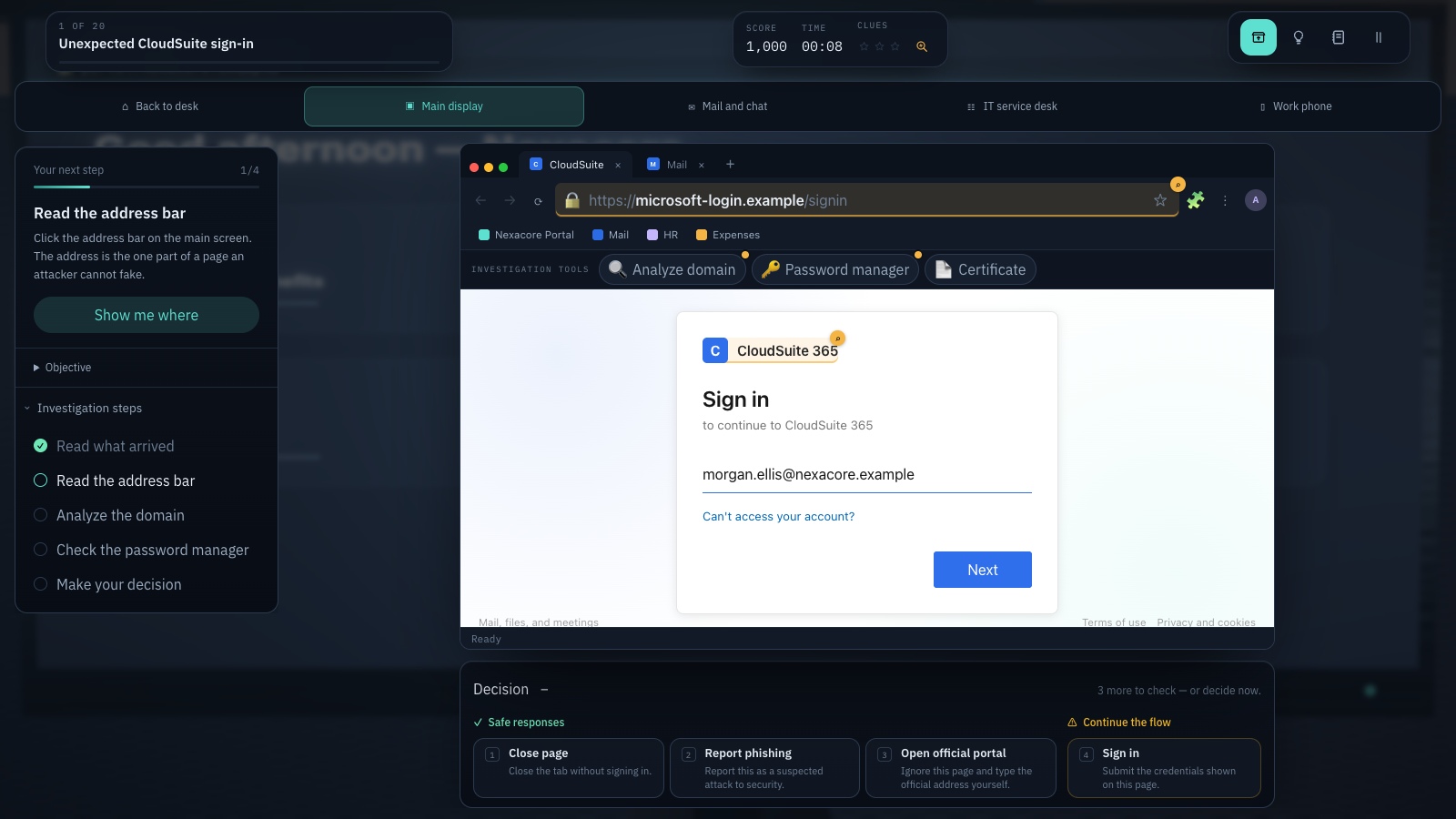
Expand image · Game screenshot · English interface
- Inspect the registrable domain
Read the registrable domain carefully; familiar words elsewhere in an address do not establish its owner.
- Use your known portal
Reach the service through a known portal and consider the context from your approved password manager.
Section sources: Four Easy Ways to Stay Safe Online
4. Follow this complete session storyboard
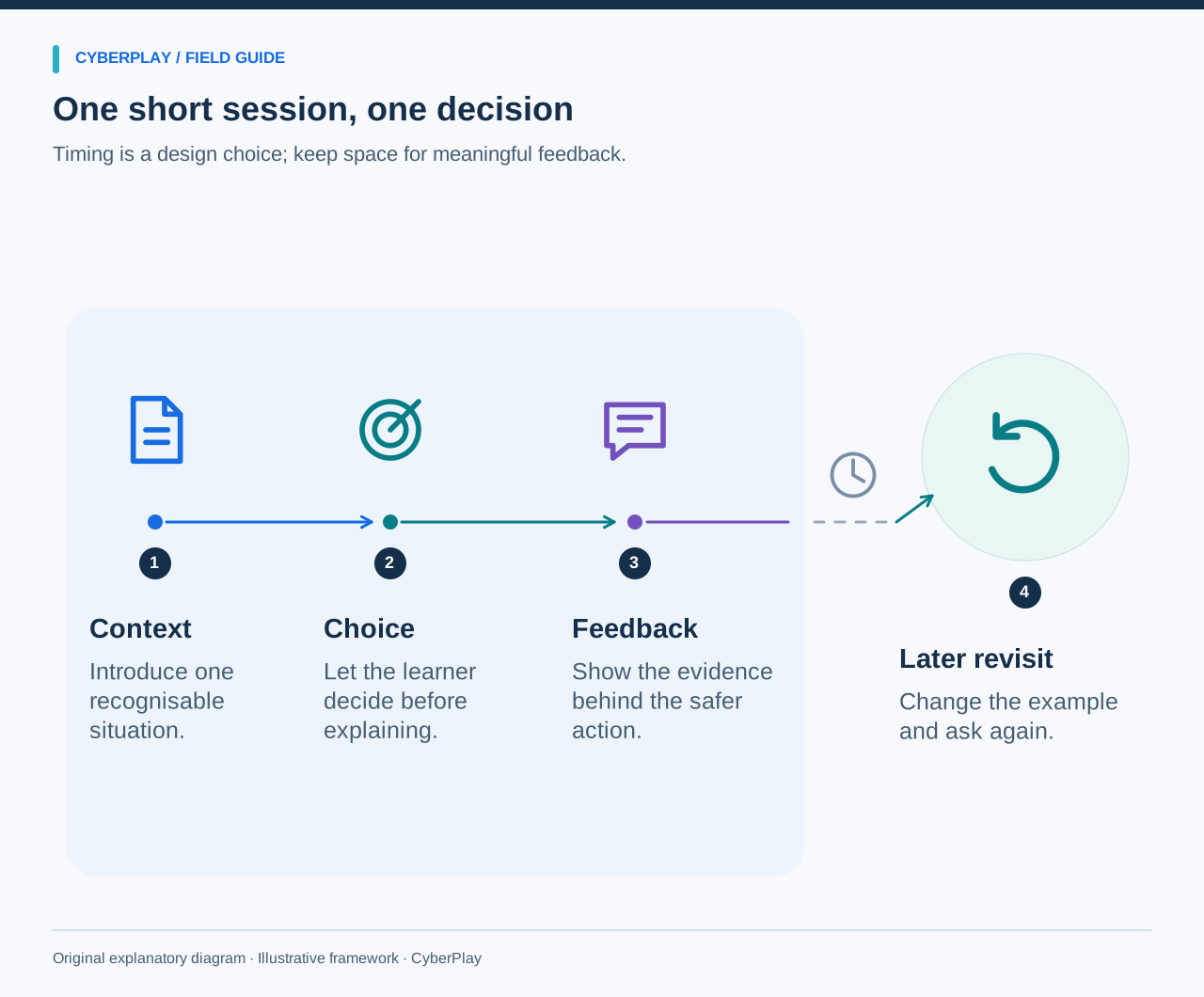
The following eight-minute plan is an example, not a deadline for learners. Allow more time for reading, assistive technology or a useful question. For a group discussion, give participants a quiet moment to choose before hearing colleagues. Otherwise the first confident answer can hide the decisions other people would have made.
| Suggested time | Facilitator action | Learner action |
|---|---|---|
| Minute 0–1 | State the role and objective: no sign-in has been started. | Read the context and locate the relevant information. |
| Minutes 1–3 | Present the approval request and withhold the answer. | Choose an action and briefly explain why. |
| Minutes 3–5 | Explain the consequences and the local approved response. | Compare the feedback with the original reasoning. |
| Minutes 5–7 | Introduce a caller who claims the approval is needed for a repair. | Apply the same verification principle to the changed request. |
| Minute 7–8 | Show the legitimate report route and invite a remaining question. | Name where help would come from and one detail to report. |
5. Present the decision before the explanation
Do not highlight the correct answer with a warning colour or label the screen as a scam before the learner chooses. Give the facts they need, then allow an authentic choice. The objective is to understand the decision, not to catch someone out with missing information. If several responses could be valid under your policy, acknowledge that and refine the prompt.
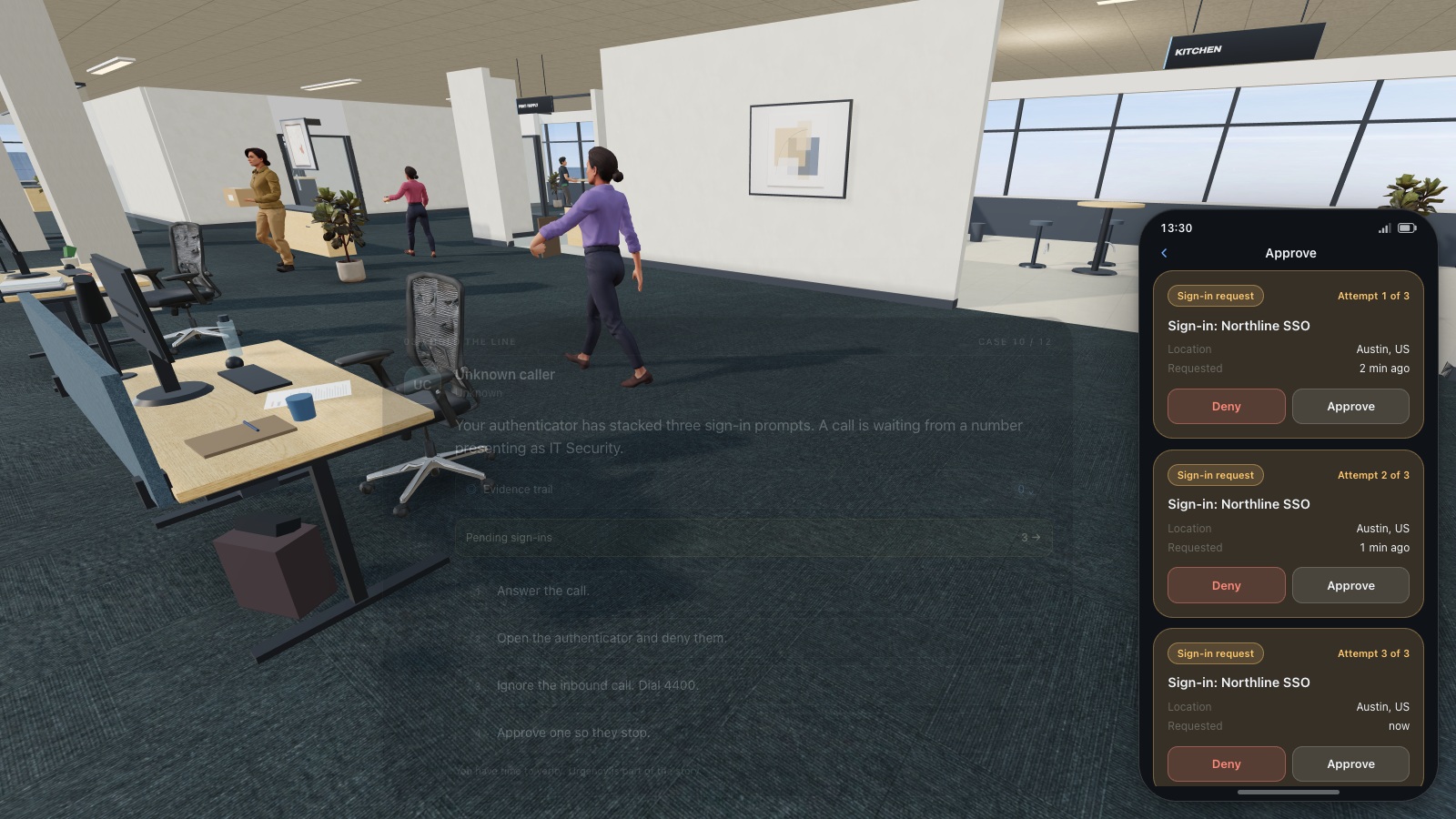
Expand image · Game screenshot · English interface
- Reject an uninitiated request
Deny a sign-in approval you did not initiate, even if another message urges you to accept.
- Report through official support
Contact the established helpdesk or security team and explain when the unexpected approval requests appeared.
6. Explain the consequence of each choice
For the approval choice, explain that an approval is part of granting account access and must correspond to an action the user intended. For the same-channel confirmation, explain why another message from the requester is not an independent check. For rejection and reporting, explain what a useful report contains: approximate time, affected service and what the person observed.
Keep the language calm and specific. A learner who chose incorrectly needs a usable alternative, not a dramatic prediction of catastrophe. Let them attempt a second version immediately after the explanation. Record the first attempt separately if you are evaluating the session; an improved retry and an independent first response answer different questions.
7. Choose an appropriate game segment
A short game activity fits when its mechanics expose the target decision clearly and its controls do not consume the whole session. Pilot the full path, including loading, instructions and any result screen. Read the actual game description and test the interaction before describing its duration to employees. Different learners may take different amounts of time.
Use the account-security topic directory to find relevant CyberPlay practice. After playing, ask the learner to connect one decision to the organisation’s sign-in procedure. Treat the game as a practice environment with its own rules. The facilitator’s job is to explain where those rules correspond to work and where local procedures add detail.
8. Schedule a changed follow-up
At a later session, change the story while preserving the principle. For example, a caller asks the employee to read out an account recovery code to keep a meeting service working. Ask the learner to identify the requested action, select a trusted check and name the reporting route without first displaying the previous answer.
Choose a practical interval and record it so results remain interpretable. If the employee can repeat the original answer but struggles with the changed request, use that as a cue for more varied practice. Do not assume the first session failed entirely or that a successful follow-up guarantees behaviour under every real-world condition.
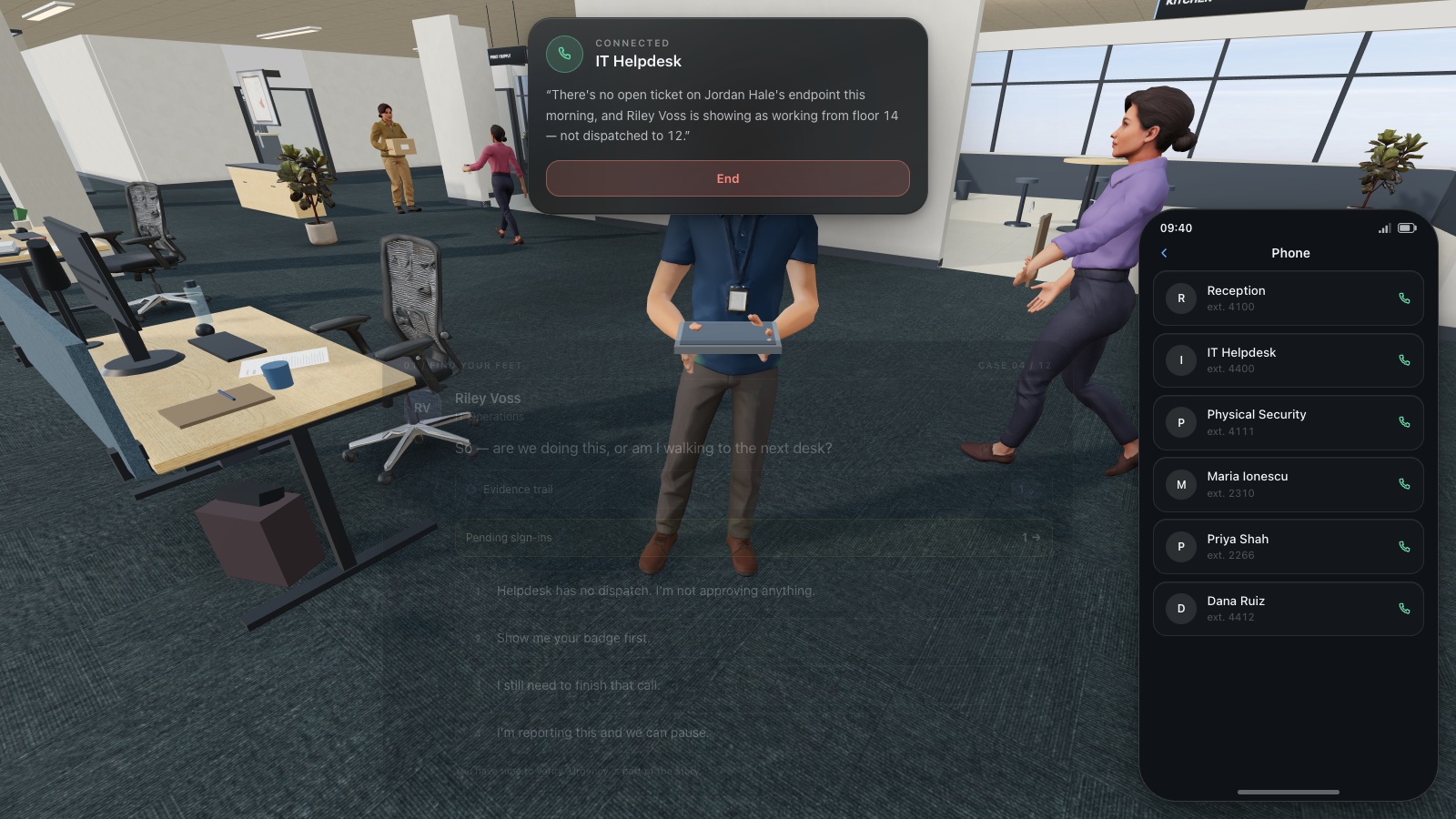
Expand image · Game screenshot · English interface
- Find the existing directory
Use the organisation's established helpdesk directory to find a trusted contact before continuing a sensitive request.
- Do not reuse supplied numbers
A number supplied by the caller is part of the request and cannot independently verify it.
9. Design for employees’ actual working time
Offer an equivalent text version when the format relies on sound, rapid mouse movement or a device unavailable to part of the workforce. Support pause and rereading. For facilitated groups, make sure quieter participants have time to form their own answer. For shift teams, schedule the activity when staff can take part without compromising operational responsibilities.
Avoid using short sessions as an excuse to interrupt work constantly. A predictable slot with a clear purpose is easier to explain and manage. NIST’s programme guidance treats learning as a maintained organisational activity. Assign someone to check that the content, reporting route and supporting policy remain current as the organisation changes.
Section sources: Building a Cybersecurity and Privacy Learning Program, SP 800-50 Rev. 1
10. Evaluate the session with a small design review
Use the checklist below after the pilot and the first delivery. The most useful improvement may be clearer context, a more plausible choice or a simpler reporting route. Keep observations about the interface separate from observations about the security decision. An employee who could not operate a control has not necessarily demonstrated a knowledge gap.
- Can the objective be stated as one observable action?
- Does the learner have enough information to make the decision?
- Does feedback explain why each plausible action matters?
- Can the employee perform the safe action using a real local process?
- Is there enough time for access needs, reflection and questions?
- Does the later scenario change the story while keeping the same principle?
- Are reported outcomes limited to the evidence actually collected?
Put the decision into practice
Try an account-security scenario and identify one decision to connect to your own sign-in and reporting procedures.
Explore passwords gamesSources and further reading
- Test-enhanced learning: taking memory tests improves long-term retention — Roediger and Karpicke, Psychological Science; PubMed record. Accessed 2026-09-13
- Four Easy Ways to Stay Safe Online — CISA. Accessed 2026-09-13
- Building a Cybersecurity and Privacy Learning Program, SP 800-50 Rev. 1 — NIST. Accessed 2026-09-13
Keep exploring
- Game-based learning vs gamification in security awareness: what changes for the learner?
Compare game-based learning, gamification and branching scenarios in security awareness using one practical objective, research limits and an evaluation worksheet.
EN · 8 min read - Security awareness training plan: a 12-month calendar with practical activities
Use an editable 12-month security awareness training calendar with decision objectives, role-based activities, debrief questions, owners and useful review measures.
EN · 8 min read - Security awareness training metrics: measure more than completion
Measure security awareness with a practical metric dictionary covering participation, decisions, retention and reporting, plus fair comparisons and clear limits.
EN · 8 min read - Human risk management metrics: turn CyberSense into a coaching plan
Read coverage, CyberSense and learning priorities by department. Use a worked example to choose employee coaching, assign practice and review the evidence.
EN · 8 min read - Phishing training games: practise the decisions behind a suspicious message
Use phishing training games to rehearse inspection, independent verification and reporting. Includes a fictional supplier message and a practical session plan.
EN · 8 min read - Security awareness games for employees: how to choose and use them
Choose security awareness games that teach useful workplace decisions. Compare formats, run a sample session, and use a practical evaluation checklist.
EN · 8 min read