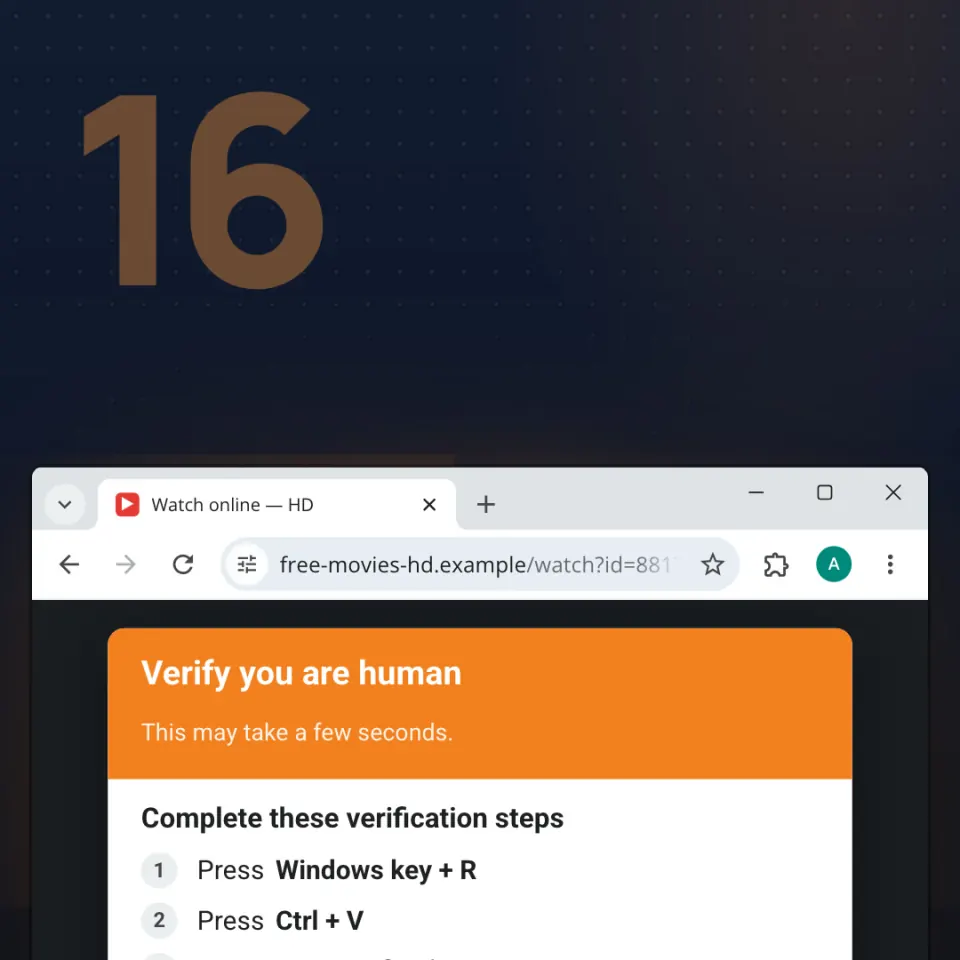
A web page tells you to “verify you are human” or “fix this error”, then asks you to press a few keys. It looks harmless, but those keys run a hidden command that installs malware on your own device. This page explains how the trick works and the one rule that stops it.
What it is
ClickFix is a social engineering trick. In a post dated 13 March 2025, Microsoft described it as fake error messages or prompts that tell you to fix a problem by copying, pasting and launching a command, which ends with malware being downloaded. You do the last step.
It is common. In its Digital Defense Report 2025 (October 2025), Microsoft said ClickFix was the most common first step in the attacks its Defender Experts handled between July 2024 and June 2025: 47% of cases. That is Microsoft's own incident data, not all attacks. In its 2026 Global Threat Report (24 February 2026), CrowdStrike counted 563% more incidents using fake CAPTCHA lures in 2025 than in 2024.
How it works
- You land on a trap page. It can arrive through a phishing email, a malicious ad, or a real website that criminals have hacked.
- A fake check or error appears. It may copy the Cloudflare or Google “I’m not a robot” box, show a browser error with a “copy fix” button, or fake a Windows Update.
- Your click copies a command. The page quietly puts a command on your clipboard. You never see it.
- The page gives you “steps”. Press Windows + R (opens the Run box, which starts programs), then Ctrl + V (pastes the hidden command), then Enter (runs it). Variants send you to Terminal or PowerShell, or ask you to paste a “file path” into File Explorer (named FileFix by the researcher mr.d0x, 23 June 2025). On a Mac, the page sends you to Terminal and then asks for your password (CloudSEK, 4 June 2025).
- Windows runs it for the attacker. Usually PowerShell, which pulls the malware straight into memory. Microsoft calls this a fileless process, often invisible to traditional security tools.
- The malware steals. Infostealers take saved passwords, cookies, cards and crypto wallets. CISA, the FBI and partners (22 July 2025) warned that the Interlock ransomware gang used a fake CAPTCHA that tells people to open the Run window.
CrashFix is nastier. In a report dated 16 January 2026, Huntress described a malicious extension that crashes Chrome on purpose. When it restarts, a page claims “security issues detected” and asks for the same three keys.
Why does it work? Fixing things yourself feels smart, and after hundreds of checks one odd step stops feeling odd. Antivirus often misses it: no file is downloaded, and Windows' own tools run the command because you told them to.
Real cases
- Lumma Stealer. On 21 May 2025, Microsoft said it had found more than 394,000 Windows computers infected with Lumma between 16 March and 16 May 2025.
- Hotels. In a post dated 13 March 2025, Microsoft Security described a campaign that began in December 2024. Hotel staff got emails that looked like Booking.com, about a negative guest review. The link opened a fake CAPTCHA, and the three keys downloaded credential-stealing malware.
- Romania and Berlin. On 14 August 2026, DCNews reported that rowater.ro, the website of Apele Române, showed a pop-up copied from Cloudflare's check: open Run, paste, press Enter. DNSC took it offline the same evening. On 7 September 2026, heise reported that Germany's BSI traced a breach of Berlin government departments to an employee who pasted such a command.
How to spot it
- A “check” or “error” page tells you to press Windows + R, open Terminal or PowerShell, or paste into File Explorer.
- It asks you to paste something you never typed and could not see.
- It makes you leave the browser. Cloudflare's documentation says a real visitor is at most asked to check a box or select a button.
- It rushes you with a countdown such as “verify within 60 seconds”.
- It offers a “copy fix” button, or “repair steps” after your browser crashed.
- On a Mac, it sends you to Terminal and then asks for your password.
What to do
- Stop. Do not press the keys. If the Run box is already open, close it. Do not paste.
- Close the tab. No real website needs you to run anything on your computer.
- Fix browser problems in the browser. Restart it and look in its settings. If it keeps crashing, remove extensions you do not recognise.
- Tell someone. At work or school, tell IT. At home, tell an adult.
If it already happened
- Disconnect from the internet and tell someone: IT at work or school, an adult at home. CISA's guidance for infected computers says the same. Say what you pasted and roughly when.
- Run a full scan with updated antivirus. IT may decide to reinstall the system.
- Assume your passwords and sessions are stolen. From another device, change important passwords (email first), sign out everywhere and turn on 2-step verification.
- Money or cards involved? Call your bank on the number printed on the card. Check crypto wallets too.
- Report it. In Romania, call 1911 (24/7) or use the DNSC site pnrisc.dnsc.ro. Fast reports protect other people, and there is nothing to be ashamed of.